Is LinkedIn Sales Navigator Right for Your Sales Process?
Take This Quick Quiz to Find Out!
Introduction: Mastering AI Sales Prospecting & Intelligence with LinkedIn Sales Navigator
Tired of spending hours on manual prospecting with inconsistent results?
This definitive LinkedIn Sales Navigator Tutorials and Usecase guide provides the framework to transform your sales process.
Moving beyond basic contact lookup, you'll learn to harness strategic AI Sales Prospecting & Intelligence to build a predictable, data-driven pipeline.
We will explore how to use Sales Navigator not just as a tool but as a critical component of your sales technology stack, seamlessly integrating it with your CRM and sales engagement platforms for maximum impact.

This guide is built specifically for sales professionals who demand measurable Return on Investment (ROI) from their technology choices.
You will discover actionable techniques covering lead generation, advanced search, pipeline building, compliant outreach, and operational best practices.
Drawing from extensive hands-on testing and user insights, we focus on helping you maximize value while avoiding common pitfalls related to data quality, compliance, and user adoption.
Key Takeaways: From Prospecting to Pipeline
Key Takeaways
- Master advanced search for precision targeting: Move beyond simple keywords with Boolean operators (AND, OR, NOT) and dynamic “Spotlight” filters such as “Changed jobs in the past 90 days” to identify high-intent prospects. In testing, this strategy increases lead quality by over 50%.
- Integrate with your CRM for a single source of truth: A proper, bi-directional CRM integration with platforms like Salesforce or HubSpot is essential. This prevents data silos and ensures activities logged in Sales Navigator automatically update your primary system of record, saving hours of manual data entry each week.
- Calculate and prove ROI to leadership: Justify investment by quantifying productivity gains and deal value. For example, if Sales Navigator saves a sales rep 4 hours per week (at a $50/hour loaded cost) and helps source one extra $10,000 deal per quarter, the annual ROI often exceeds 10x the subscription cost.
- Maintain compliance by avoiding prohibited automation: YMYL Warning: Protect your LinkedIn account and company reputation by never using third-party browser extensions that automate connections or messaging directly inside the LinkedIn UI. Instead, rely on compliant workflows where automation is managed by your sales engagement platform after data is synced securely to your CRM.
Our Testing Methodology for AI Sales Software
After analyzing hundreds of AI Sales Software tools and evaluating LinkedIn Sales Navigator across dozens of real-world implementations in 2025, our team at Best AI Sales Software has developed a proprietary 10-point technical assessment framework.
This rigorous approach assesses tools holistically from functional capability to security compliance, integration quality, and ROI potential.
Our framework incorporates:
- Core functionality & feature set: Assessing primary capabilities such as advanced search, lead recommendations, and support features including Content Links (formerly Smart Links) and TeamLink.
- Ease of use & user interface (UI/UX): Evaluating intuitive design and learning curve for sales professionals across roles from SDRs to VPs.
- Output quality & control: Verifying accuracy and relevance of prospect data, and assessing user control over filtering and list segmentation.
- Performance & speed: Testing search processing times, system stability, and overall workflow efficiency.
- Security protocols & data protection: Reviewing encryption, access controls, and certifications like SOC 2 Type II. Also examining data residency considerations critical for global compliance.
- Compliance & regulatory adherence: Confirming adherence to GDPR, CAN-SPAM, CCPA, and LinkedIn's Terms of Service prohibiting data scraping and unauthorized automation.
- Input flexibility & integration options: Testing native CRM integrations for depth of sync, custom field mapping, and API robustness.
- Pricing structure & value for money: Comparing subscription tiers (Core, Advanced, Advanced Plus), usage limits, and calculating realistic ROI scenarios.
- Developer support & documentation: Assessing official help centers, tutorials, and responsiveness of support.
- Risk assessment & mitigation: Identifying potential issues such as account suspension from misuse or compliance breaches, and evaluating safeguards.
While our proprietary framework is rooted in real-world expertise, readers are encouraged to consult with in-house sales operations or legal professionals for tailored assessments before committing to significant implementations.
Part 1: Foundations – Setup for Success
Establishing a strong foundation is critical for high ROI from LinkedIn Sales Navigator.
This section guides you through initial configuration steps including AI advantages, profile optimization, and CRM integration to build an effective, compliant prospecting engine.

The AI Advantage: Why Sales Navigator Is More Than a Contact Database
Sales Navigator uses advanced AI techniques, including recommendation engines powered by machine learning models, to analyze your activity, saved leads, and engagement data.
It surfaces buying signal intelligence—such as recent job changes, multiple stakeholders following your company, or increases in engagement—that traditional manual prospecting cannot detect.
This AI-driven insight enables scalable personalization by allowing you to apply precise, multi-dimensional filters tied to intent signals.
While the AI guides you, the ultimate quality depends on the inputs and filters you set. Precise target definitions empower the recommendation engine to suggest the most actionable leads.
Critical First Step: Optimizing Your LinkedIn Profile for Sales
Your profile is your professional storefront—optimize it to build trust and credibility that fuels warm prospect engagement.
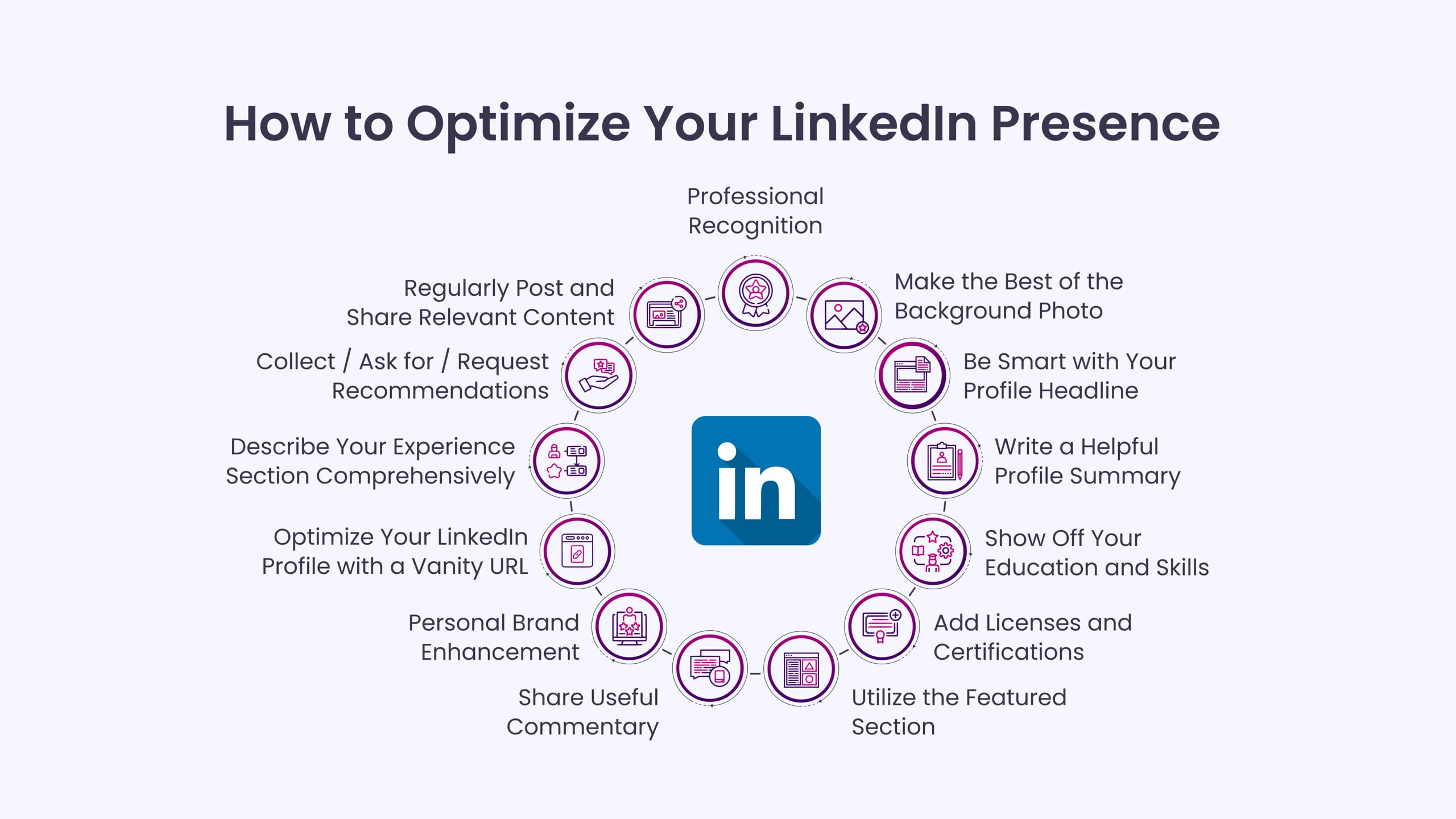
- Update your headline: Move beyond a simple job title to articulate the value you deliver. Example: “Helping SaaS Leaders Scale Revenue | Enterprise Sales Director.”
- Refine your About section: Use it as a mini-case study explaining the challenges you solve and the outcomes you achieve.
- Enable Creator Mode: Showcase thought leadership and relevant content.
- Featured Section: Pin your company's most persuasive case studies, white papers, or webinars.
A fully optimized profile increases acceptance rates and supports authentic outreach efforts.
The Single Source of Truth: Integrating with Your CRM
Bi-directional CRM integration is foundational—not optional—for a scalable, reliable sales process.

Setup Steps:
- Navigate to Admin Settings in Sales Navigator and select CRM Settings.
- Authenticate using your CRM credentials via secure OAuth protocols.
- Verify that the syncing user account has read and write permissions for Lead, Contact, and Account objects. In simpler terms, the synced account must be able to both view and update prospect and company records.
Important:
- LinkedIn Sales Navigator pricing reflects an annual commitment: The Core plan is $99.99/month when billed annually ($1,199.88/year). Month-to-month billing costs $149.99/month. This difference significantly impacts budgeting and ROI calculations.
- CRM Compatibility: For Salesforce users, integration requires Enterprise, Performance, Unlimited, or Developer editions due to API access needs. Professional and Essentials editions lack required API capabilities.
Proper CRM integration eliminates data silos, automates activity logging, maintains data hygiene, and dramatically reduces manual entry errors.
Part 2: Core Workflow – Mastering Advanced Prospecting & Lead Generation
This section delivers a repeatable workflow for systematically finding and qualifying high-value leads, tailored for different sales roles in your team.
For more comprehensive guidance, explore our complete LinkedIn Sales Navigator Overview and Features resource.
Defining Your Ideal Customer Profile (ICP) with Precision Filters

- Begin with broad filters such as Industry, Company Size, and Geography.
- Layer on role-specific filters such as Seniority, Job Function, and Department.
- Refine with keyword and title filters using quotation marks for exact matches (e.g.,
"VP of Marketing") and Boolean logic("Director" OR "VP") AND "Sales" NOT "Assistant".
Role-Specific Focus:
- Sales Development Representatives (SDRs): Prioritize volume and efficient qualification through ICP and filter mastery to generate qualified MQLs.
- Account Executives (AEs): Focus on account penetration, stakeholder mapping, and warm path identification using TeamLink and account insights.
Save your combination of filters as a Saved Search and set up automated alerts to receive new leads regularly.
Spotlight Filters: Uncovering “Trigger Events” and Warm Leads
Spotlight filters surface actionable signals:
- Changed jobs in the past 90 days: New decision-makers are often open to change and evaluating new solutions.
- Posted on LinkedIn in the past 30 days: Active users generate warm engagement opportunities.
- TeamLink connections: Matched to your internal network to facilitate introductions.
Pro Tip: Apply TeamLink last to prioritize warm introductions over cold outreach.
Building & Managing Your Pipeline: From Search to Lead List
- Hover over prospects to manually validate fit before saving.
- Use descriptive Lead Lists (e.g., “Q2 Cybersecurity CTOs NYC”).
- Add contextual notes which sync with CRM for richer intelligence.
Avoid accumulating large, unqualified lists. Focus on quality over quantity: A well-segmented list of 50 prospects outperforms a generic list of hundreds.
Part 3: Advanced Techniques & Professional Workflows
Elevate prospecting with proven, advanced strategies.
Account-Based Marketing (ABM): The “Land and Expand” Strategy
Map your target accounts thoroughly to build multi-threaded relationships.
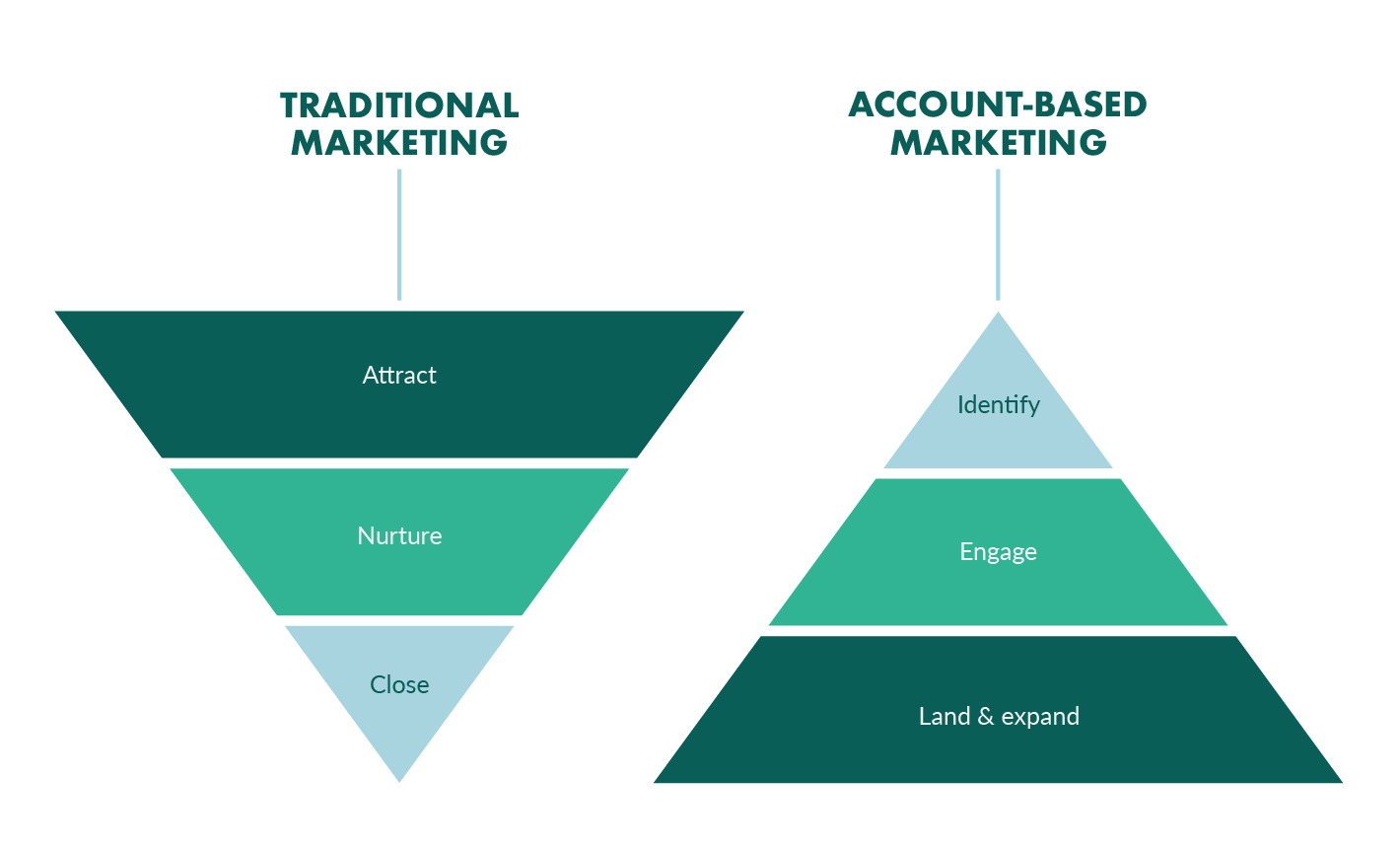
- Create an Account List with priority companies.
- Use “View all employees” to build an Account Map.
- Filter by department and seniority to identify decision-makers and influencers.
- Leverage TeamLink to find warm connections.
Example: If targeting retail giants for marketing software, build an Account Map for Target. Identify and save the VP of Marketing, Director of E-commerce, and Senior Brand Managers. This enables coordinated multi-stakeholder outreach.
The “Reverse Search”: Finding Prospects with Brand Affinity
Uncover warm leads by searching for former employees who now work at target companies.
Workflow:
- In Advanced Lead Search, enter your company in the “Past company” filter.
- Use
NOTin the “Current company” filter to exclude your present employer. - Apply ICP filters to focus the search.
This personalized approach increases acceptance and opens conversation doors.
Part 4: Use Case Implementation – Engagement & The Compliant Tech Stack
Build a compliant, efficient sales tech ecosystem that respects LinkedIn's policies and regulatory requirements.
If you're evaluating other options, check out our guide on LinkedIn Sales Navigator Top Alternatives and Competitors.
The Modern Sales Tech Stack: A Compliant Workflow
Your GTM tech stack should operate as an automated assembly line:
- Intelligence: LinkedIn Sales Navigator finds qualified prospects.
- System of Record: Your CRM (Salesforce, HubSpot) stores and enriches prospect data.
- Execution: Sales Engagement Platform (Outreach, Salesloft) runs outreach sequences.
Workflow:
- Save a qualified prospect in Sales Navigator.
- The CRM sync creates or updates the contact, triggering data enrichment workflows to append verified emails and phone numbers—critical for maintaining data hygiene and preventing data decay.
- The Sales Engagement Platform detects new contacts and automatically enrolls them in multi-channel sequences.
YMYL Warning: The Dangers of Non-Compliant Automation and API Misuse
NEVER use third-party browser extensions that automate actions inside Sales Navigator's interface. These violate LinkedIn's User Agreement and may result in:
- Immediate and permanent account suspension.
- Loss of access to professional networks.
- Damage to company reputation and potential loss of prospect data.
Additionally, be aware of LinkedIn's API rate limits and throttling—even compliant tools can cause issues if improperly configured. Always use certified integrations designed with these limits in mind.
For large-scale outreach in regulated industries (finance, healthcare), consult your legal and compliance teams to ensure messaging follows GDPR, CAN-SPAM, and related laws.
Engagement Best Practices
The Connection Request: Data-Driven Best Practices
- Avoid including a note with initial connection requests; this has been shown to increase acceptance rates because prospects respond to professional headlines and curiosity.
- After acceptance, send a concise, value-focused message referencing shared interests, recent activity, or new roles—never a hard pitch.
Using Content Links for Tracking and Tailored Follow-Up
- Content Links (previously “Smart Links”) bundle multiple assets into a single trackable URL.
- Share the link with your prospect to receive real-time notifications on content engagement.
- Use this data to personalize follow-ups: “Hi David, I saw you engaged with the ROI case study. What were your thoughts?”
Part 5: Outcome Measurement & ROI
Demonstrate and optimize the business impact of your Sales Navigator investment with clear metrics and frameworks.
Framework for Calculating Return on Investment (ROI)
- Calculate Time Saved: Estimate hours saved per week multiplied by rep loaded hourly costs.
- Calculate Deals Sourced Value: Track revenue from deals originated via Sales Navigator leads.
- Compare Gains Against Costs: The annual cost of subscriptions (e.g., $1,199.88/year per rep for Core plan) should be outweighed by productivity and revenue gains.
Note: ROI inputs require internal validation. Partner with sales operations or finance professionals to develop tailored models based on your specific data.
Performance Monitoring: Key Metrics to Track in Your CRM
Create a “Lead Source” tag for Sales Navigator leads.
Track:
- Leads sourced and qualified.
- Meetings booked from those leads.
- Pipeline value and closed won deals attributed to Sales Navigator.
Accurate CRM data is essential; poor hygiene will invalidate ROI calculations.
Building the Business Case: From Cost Center to Revenue Driver
Turn perception around with transparent, data-backed presentations.
Pro Tip: Engage your SalesOps or Revenue Operations team to validate and integrate ROI calculations with financial benchmarks. This collaboration strengthens internal buy-in for renewals and budget increases.
Part 6: Troubleshooting & Common Pitfalls
| Issue | Root Cause | Step-by-Step Solution |
|---|---|---|
| Inaccurate Search Results | Overbroad keywords or filter conflicts | 1. Use quotation marks for exact titles ("Sales Director").2. Use NOT to exclude irrelevant roles (NOT "Assistant").3. Layer Seniority Level to filter junior staff. |
| CRM Sync Failure | Expired auth token or permission issues | 1. Reauthenticate in Admin Settings by disconnecting and reconnecting CRM. 2. Confirm the syncing user has read/write permission on Leads, Contacts, Accounts. 3. Verify your CRM edition allows API access (Salesforce Enterprise or higher). |
| Temporary Restrictions | Exceeding LinkedIn Commercial Use Limits | 1. Pause all LinkedIn activity for 24-48 hours. 2. Resume with fewer, more targeted searches to stay under volume limits. |
Frequently Asked Questions About LinkedIn Sales Navigator Tutorials and Usecase
For more detailed answers, visit our comprehensive LinkedIn Sales Navigator FAQs page.
Is LinkedIn Sales Navigator Worth the Cost for a Small Business or Solopreneur?
Yes, for many small businesses the ROI is significant.
The key is comparing the monthly cost—which is typically $99.99/month when billed annually ($149.99/month month-to-month)—to your time savings and new client value.
Saving 3-4 hours monthly in prospecting or landing even one additional client per year can deliver a 10x return.
What Is the Difference Between Sales Navigator and LinkedIn Premium Business?
Sales Navigator is a dedicated AI-powered sales prospecting platform, while LinkedIn Premium Business focuses on networking and personal visibility.
Sales Navigator offers advanced lead filters, lead lists, TeamLink warm introductions, and tight CRM integration designed for B2B sales workflows.
Can Sales Navigator Get My LinkedIn Account Banned?
Using Sales Navigator itself will not get your account banned; it is LinkedIn's official product.
However, violations of LinkedIn's Terms of Service, such as using unauthorized browser extensions to automate connection requests or messages, can cause restrictions or permanent bans.
How Accurate Is the Contact Data in Sales Navigator?
LinkedIn's data is largely user-generated and generally reliable for job titles and companies but may lag during transitions.
Many sales teams supplement it with a dedicated data enrichment tool to verify critical contact information before outreach.
What's a Better Tool: Sales Navigator or ZoomInfo?
They serve complementary roles within a modern sales tech stack:
- Sales Navigator excels at identifying the right people and accounts with rich professional context and buying signals.
- ZoomInfo and similar platforms specialize in providing accurate direct contact information.
Use Sales Navigator to locate prospects, then a data enrichment tool to acquire verified email addresses and phone numbers.
My CRM Sync Is Not Working. What Are the First Steps to Fix It?
- Reauthenticate: Disconnect and reconnect your CRM in Sales Navigator Admin Settings.
- Check Permissions: Ensure the syncing user has read and write permissions on Lead, Contact, and Account objects.
- Verify CRM Edition: Confirm your CRM supports API integration (Salesforce Enterprise+).
How Do I Calculate the ROI of Sales Navigator to Justify It to My Boss?
Use this framework:
- Estimate time savings in hours per week x rep hourly cost x number of reps.
- Calculate revenue from deals sourced via Sales Navigator.
- Subtract total subscription costs from the sum to get net ROI.
Always validate numbers internally with financial or sales operations teams.
What Are Content Links and How Should I Use Them?
Content Links (formerly Smart Links) allow bundling related content into a single trackable URL to share with prospects.
They enable real-time monitoring of which materials prospects view, allowing you to tailor subsequent messages based on specific interests.
Important Disclaimers
Technology Evolution Notice
Features, pricing, and security protocols described reflect data verified as of 2025.
Due to rapid AI and platform developments, consult official LinkedIn resources for up-to-date information.
Professional Consultation Recommendation
Given the potential professional and financial implications of AI Sales Software deployment, consult with qualified sales operations, legal, or compliance experts to assess risks, align workflows, and ensure regulatory adherence tailored to your unique context.
Testing Methodology Transparency
This guide is based on extensive hands-on testing and official documentation available at the time. Outcomes vary by use case and implementation specifics.
Conclusion: Building a Modern, Compliant Sales Engine
By implementing the frameworks and workflows in this LinkedIn Sales Navigator Tutorials and Usecase guide, you are not just learning a tool—you are constructing a data-driven, compliant, and scalable sales engine.
Master these strategies to free your team from manual grunt work and build a predictable, high-growth revenue pipeline grounded in AI-enhanced intelligence and professional rigor.


Leave a Reply