Is LinkedIn Sales Navigator the Right Prospecting Tool for You?
Take This Quick Quiz to Find Out!
Key Takeaways
- AI-Powered Prospecting: LinkedIn Sales Navigator uses advanced AI filters to help sales professionals find and engage the right prospects efficiently, transforming traditional prospecting into a data-driven process.
- Premium vs Navigator: While LinkedIn Premium focuses on personal networking, Sales Navigator is specifically designed for systematic sales prospecting with advanced search filters and team collaboration features.
- Free Trial Available: Sales Navigator offers a 30-day free trial with full access to most core features, allowing you to test advanced search, lead tracking, and InMail messaging before purchasing.
- Strong ROI Potential: When used strategically, Sales Navigator delivers measurable ROI through time savings, higher-quality pipeline, improved response rates, and warm introductions via TeamLink.
- Privacy Compliant: Sales Navigator complies with GDPR, CCPA, and other data privacy regulations, using only publicly shared LinkedIn profile information while maintaining SOC 2 Type II security certification.
What is LinkedIn Sales Navigator and how does it actually work in AI sales software?
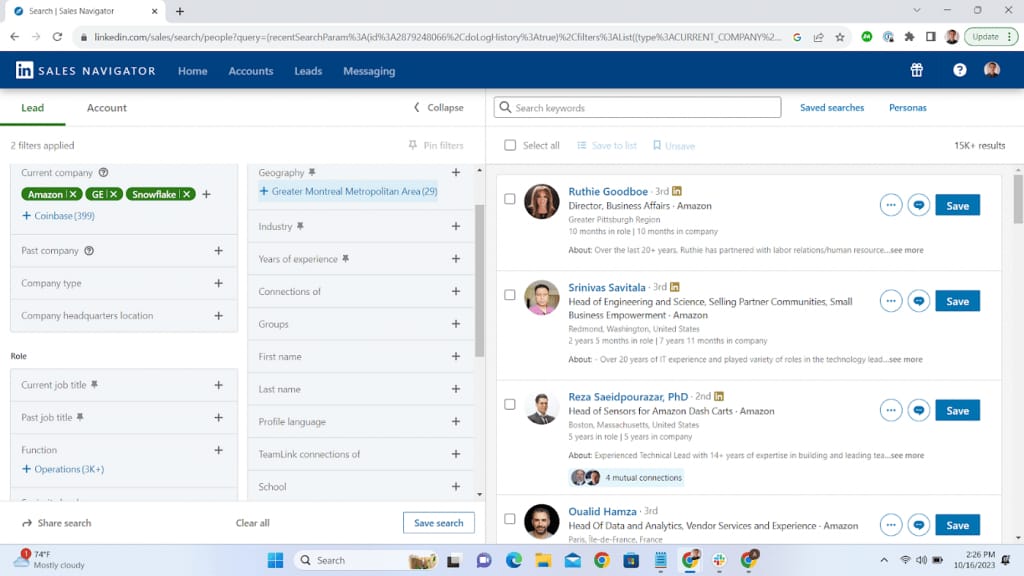
LinkedIn Sales Navigator is a premium AI-powered sales prospecting platform designed to help sales professionals find, understand, and engage the right prospects more efficiently. It uses the vast LinkedIn network and layers advanced AI-driven search filters and real-time insights to transform traditional prospecting into a data-driven, targeted process.
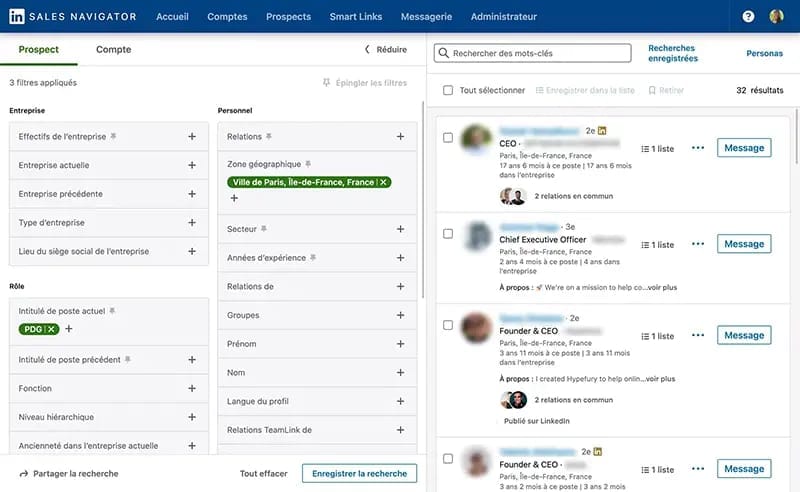
Unlike standard LinkedIn searches, Sales Navigator offers dozens of sophisticated filters such as company size, industry, seniority level, technologies used, and “spotlights” like recent job changes or active LinkedIn activity. This enables sales reps to build precise lead and account lists tailored to their Ideal Customer Profile (ICP). For more insights on using these capabilities, explore our comprehensive LinkedIn Sales Navigator Overview and Features.
The workflow involves:
- Advanced Lead & Account Search: AI-powered filters curate high-quality, targeted lists, eliminating hours of manual research.
- Saving & Tracking Leads: Sales Navigator continually monitors saved leads and accounts, providing timely alerts on job changes, company news, or prospect activity—critical buying signals AI surfaces.
- Direct Engagement via InMail: Users can send personalized messages directly through LinkedIn's platform, even to prospects outside their network, leveraging AI insights for relevant outreach timing.
- CRM Integration: The tool integrates with CRMs like Salesforce and HubSpot, allowing bi-directional data sync that keeps prospect records current without duplicate entry.
By embedding AI into discovery and outreach workflows, LinkedIn Sales Navigator multiplies a sales rep's efficiency—freeing them from manual database hunting and enabling smarter, more timely connections. It's a foundational AI sales software solution that turns LinkedIn into an active engine of prospect intelligence and engagement, accelerating pipeline building and deal velocity.
What is the difference between LinkedIn Premium and LinkedIn Sales Navigator in AI sales software?
LinkedIn Premium and LinkedIn Sales Navigator serve different purposes in the sales ecosystem, with Navigator being a specialized AI sales tool designed for systematic prospecting and pipeline development.
LinkedIn Premium (Business) is aimed primarily at general professional networking and personal branding. It offers basic tools such as:
- Viewing who visited your profile in the past 90 days
- A limited number of InMail messages
- Unlimited profile browsing
- Basic company insights for market research
LinkedIn Sales Navigator, by contrast, is tailored for sales professionals focused on finding and engaging prospects at scale using AI-powered insights. Key capabilities include:
- Extensive advanced search filters beyond Premium, like company technologies, seniority levels, and hiring intent filters
- The ability to save and organize leads and accounts with automated tracking and alerts for meaningful changes (e.g., job changes)
- Team collaboration features like TeamLink that show warm introductions through colleagues' networks
- Deep integrations with Salesforce and HubSpot CRMs to synchronize prospect activity and reduce data silos
Put simply, LinkedIn Premium helps you boost your professional visibility, while Sales Navigator helps you discover and engage the right buyers efficiently as part of an AI-enhanced sales prospecting process.
Sales Navigator's AI tools automate significant portions of research and targeting, dramatically improving the speed and accuracy of prospecting. For sales reps aiming to leverage AI sales software to scale outreach and pipeline quality, Sales Navigator is the purpose-built platform. To understand more about its practical applications, check out our LinkedIn Sales Navigator Tutorials and Usecase.
Is there a free version or free trial for LinkedIn Sales Navigator in AI sales software?
LinkedIn Sales Navigator does not offer a free version, but it consistently provides a 30-day free trial for new users to evaluate the platform before purchasing. This trial grants full access to most core features, allowing sales professionals to experience the AI-powered advanced search filters, lead and account tracking, and InMail messaging firsthand.
During the free trial, you can:
- Build targeted lead and account lists using AI-driven filters to match your Ideal Customer Profile.
- Save leads and receive alerts on critical buying signals like job changes or company updates.
- Test sending InMail messages to prospects outside your network to evaluate outreach effectiveness.
- Explore workflow integration with your daily sales tools and CRM systems to streamline pipeline management.
To start the trial, you'll need to provide a credit card, and it's important to cancel before 30 days if you decide against continuing to avoid automatic charges. For sales teams, LinkedIn sales reps may offer longer pilot periods to better demonstrate ROI.
The trial is invaluable for understanding how Sales Navigator's AI sales prospecting capabilities can seamlessly fit into your sales workflow and save hours on manual research, ultimately increasing deal velocity and pipeline quality.
How much does LinkedIn Sales Navigator cost in 2025 for AI sales software users?
LinkedIn Sales Navigator's pricing in 2025 remains tiered to serve different sales team sizes and needs, with the following US market rates:
| Tier | Monthly Price per User* | Key Features |
|---|---|---|
| Sales Navigator Core (Professional) | ~$99 per user/month (annual plans ~ $79/month) | Advanced lead/account search, alerts on saved leads and accounts, custom lists, 50 InMail credits/month. |
| Sales Navigator Advanced (Team) | $159.99 per user/month (annual discounts available) | All Core features plus TeamLink (warm introductions), Smart Links for content tracking, CRM sync with Salesforce/HubSpot. |
| Sales Navigator Advanced Plus (Enterprise) | Custom pricing, requires sales consultation | Includes all Advanced features plus enhanced CRM integrations, enterprise administration, broader user access including non-sales roles. |
*Pricing may vary based on region and currency; always verify the latest rates on LinkedIn's official site before purchase.
For individual reps, the Core plan often suffices. Teams benefit greatly from the Advanced plan, especially due to TeamLink, which unlocks network connections across colleagues—a feature proven to improve warm outreach success rates significantly.
When budgeting for Sales Navigator, consider the time and pipeline quality ROI embedded in AI-driven prospecting and alerts, which often justify the higher price point quickly by reducing wasted effort and speeding conversions. For enterprise buyers, the Advanced Plus tier offers extensive customization and deeper automation for complex sales organizations.
Is LinkedIn Sales Navigator worth the money? What is the ROI in AI sales software?
LinkedIn Sales Navigator delivers strong ROI when used strategically as part of an AI-powered sales prospecting workflow. Its worth extends beyond basic contact discovery to providing actionable context and timing that improves sales outcomes significantly. For a detailed evaluation, read our LinkedIn Sales Navigator Review.
Key ROI drivers include:
- Time Savings: Sales Navigator automates the cumbersome, manual task of prospect searching and monitoring activities. Reps often save several hours weekly by receiving AI-curated leads and real-time alerts on key buying signals, freeing time to focus on selling.
- Higher-Quality Pipeline: AI filters enable reps to build precise lists of ideal prospects fitting detailed ICP criteria. This reduces unproductive outreach and increases conversion likelihood.
- Improved Response Rates: Alerts on job changes, company news, or prospect content engagement enable targeted, personalized outreach at the moment prospects are most receptive. This dramatically improves reply rates compared to cold outreach.
- Warm Introductions via TeamLink: For teams, unlocking colleagues' networks through TeamLink accelerates trust-building and shortens sales cycles—one warm intro can replace weeks of cold outreach.
- Example ROI Calculation: If a rep's hourly value is $50 and Sales Navigator saves them 5 hours a month, that equates to $250 saved versus a subscription cost of $99-$160, effectively paying for itself immediately. Added pipeline lift and conversion improvements multiply ROI further.
Pro Tip: True ROI appears when reps leverage Sales Navigator's intelligence over time. Instead of blasting thousands of contacts, focus on smaller segments (25-50 highly qualified leads), turn on alerts, and engage strategically. This AI sales software approach yields meaningful pipeline acceleration and closed deals.
Can you get email addresses or phone numbers with LinkedIn Sales Navigator in AI sales software?
No, LinkedIn Sales Navigator does not provide direct access to email addresses or phone numbers as it strictly adheres to privacy standards and LinkedIn's user data policies. Its primary role is to help identify and engage prospects within the LinkedIn ecosystem using InMail messaging and connection requests.
Sales Navigator data is based on information users voluntarily provide and publicly display on their LinkedIn profiles—not private contact details. While some contacts share emails in their LinkedIn profile “contact info” section, this is not the norm or a feature surfaced by Sales Navigator itself.
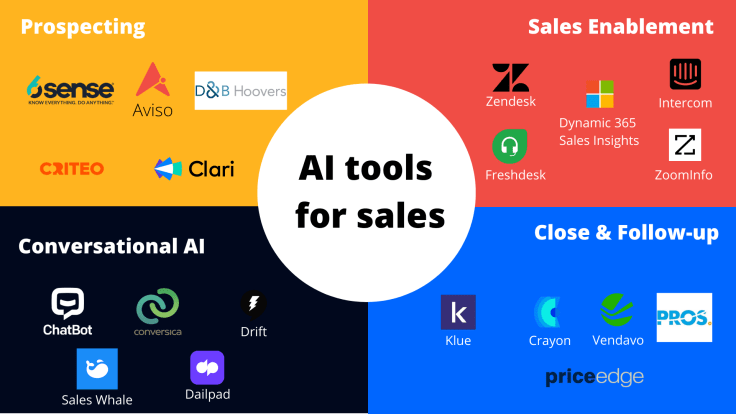
For sales teams needing verified email and phone data, a common AI sales software strategy is to combine Sales Navigator's precise prospecting intelligence with third-party data enrichment tools such as ZoomInfo, Apollo.io, or Lusha. The typical workflow is:
- Use Sales Navigator to build accurate, filtered prospect lists with AI-driven insights.
- Export or reference these names/companies (mindful of LinkedIn terms) in an enrichment tool specializing in verified contact data.
- Use enriched contact information for multi-channel outreach—email, phone calls, and InMail.
This combined stack leverages the strengths of AI-enhanced prospect identification from Sales Navigator plus reliable contact data from dedicated enrichment platforms, maximizing outreach effectiveness while respecting privacy and compliance. For more alternative tools, explore our guide on Best 10 AI Sales Prospecting & Intelligence platforms.
How accurate is the data in LinkedIn Sales Navigator for AI sales software users?

LinkedIn Sales Navigator data accuracy primarily depends on the self-reported information users maintain on their LinkedIn profiles, making it generally reliable for firmographics, job titles, and career history—but with practical limitations.
Strengths include:
- Current Roles and Seniority: Most professionals keep their current employer and position updated for networking purposes, so this data is usually accurate and recent.
- Company Data: Industry, location, and employee count ranges tend to be correct at a high level.
- Career Timeline: Job history and tenure often reflect reality well, assisting in seniority targeting filters.
Limitations and considerations:
- Profile Update Lag: There can be delays (weeks or months) before users update profiles after job changes, leading to some outreach targeting people no longer in a role.
- Company Headcount Fluctuations: Employee counts are approximate and may not reflect sudden layoffs or hiring surges.
- “Ghost” Profiles: Former employees occasionally remain linked to company pages, creating artificially inflated data.
- Technology Used Filters: These rely on inferred signals and may be inconsistent or incomplete.
Best Practice: Use Sales Navigator data as a powerful starting point, not an absolute database. Perform spot checks on key prospects by reviewing their LinkedIn activity, recent posts, and cross-referencing company websites before launching major outreach campaigns. This quick verification step, which takes only a few minutes, can save wasted effort on stale or inaccurate leads.
In AI sales software workflows, combining Sales Navigator data with additional verification or enrichment tools further improves outreach success.
How does LinkedIn Sales Navigator integrate with Salesforce and HubSpot in AI sales software?
LinkedIn Sales Navigator offers robust integration with Salesforce and HubSpot, designed to connect AI-powered prospecting insights directly to the CRM for seamless sales workflow and data alignment.
Integration capabilities include:
- Bi-Directional Sync & Activity Writeback:
- Salesforce (Advanced Plus Plan): Automatically imports/syncs matching Lead and Contact records into Sales Navigator, while InMails, messages, and notes recorded in Navigator write back into Salesforce activity timelines, eliminating duplicate data entry.
- HubSpot (Advanced Plan): Displays HubSpot contact and deal information within the Sales Navigator interface, with one-click logging of InMails and notes back to HubSpot records.
- Embedded Sales Navigator Profiles: Within Salesforce or HubSpot contact/lead pages, users can launch Sales Navigator profile windows that display AI-driven LinkedIn insights—such as icebreakers, shared connections, and recent activity—without leaving the CRM.
- List and Report Sync: Lead lists can be created from Salesforce reports or HubSpot contact segments directly within Sales Navigator, ensuring prospecting targets align with CRM-defined audiences.
Requirements and Setup:
- Integration is available only for Sales Navigator Advanced (Team) and Advanced Plus plans.
- Administrative permissions on both CRM and LinkedIn accounts are required.
- Setup involves installing LinkedIn's official apps from the Salesforce AppExchange or HubSpot Marketplace.
This CRM integration increases adoption by centralizing AI-powered prospect intelligence and communication tracking, reducing admin work, and improving data cleanliness—all critical factors for sales rep productivity and pipeline accuracy.
Can you export lead lists from LinkedIn Sales Navigator to a CSV file in AI sales software?
No, LinkedIn Sales Navigator does not support native exporting of lead or account lists to CSV files. This restriction is intentional to protect user data privacy, prevent scraping, and ensure engagement within the LinkedIn ecosystem.
The recommended and compliant method to access saved lead data externally is through official CRM integrations with Salesforce or HubSpot available in the Advanced and Advanced Plus plans. These integrations sync lead and account information directly into CRM records, maintaining data integrity and avoiding violations of LinkedIn's terms.
While some third-party browser extensions claim to scrape and export Sales Navigator data, use of these tools is risky: it breaches LinkedIn's user agreement and can result in account suspension or bans.
For small-scale needs, manual copy-pasting may be possible but is inefficient and not scalable.
To maximize pipeline management without exporting, sales teams should leverage CRM sync features that keep prospect data unified, up-to-date, and actionable within their existing sales systems—maintaining compliance and workflow efficiency.
Is LinkedIn Sales Navigator compliant with GDPR and other data privacy regulations in AI sales software?
Yes, LinkedIn Sales Navigator is designed to comply with major data privacy regulations, including the European GDPR and California's CCPA. LinkedIn maintains a strong commitment to data protection and holds security certifications like SOC 2 Type II to ensure confidentiality and integrity of user data.
Compliance highlights:
- Data Processing Agreements (DPAs): Available for enterprise customers to clarify responsibilities between LinkedIn (data processor) and client organizations (data controllers).
- User Consent and Control: Sales Navigator uses data that LinkedIn members have voluntarily shared publicly on their profiles, with members retaining control over their visibility and privacy settings.
- Legitimate Interest Basis: B2B sales outreach under Sales Navigator is often considered lawful under GDPR's legitimate interest exemptions when outreach is relevant, non-intrusive, and respects individuals' rights.
- Security Measures: Encryption, access controls, and auditing processes protect sensitive data from unauthorized use.
Your Organization's Responsibilities:
- Ensure you have a lawful basis for processing prospects' data.
- Minimize data collection to what is necessary.
- Honor opt-out and do-not-contact requests promptly.
- Maintain transparency in outreach communications about who you are and why you are contacting prospects.
In summary, while Sales Navigator provides a compliant platform, it is the responsibility of your sales and legal teams to implement compliant processes when using the tool—maintaining ethical and legal sales prospecting practices in all regions.
For more detailed guidance and insights, consider reading our comprehensive resources: LinkedIn Sales Navigator Review, LinkedIn Sales Navigator Top Alternatives and Competitors, and our guide on Best 10 AI Sales Prospecting & Intelligence platforms to optimize your AI sales software toolkit.


Leave a Reply