Is LeadIQ the Right AI Prospecting Tool for Your Sales Team?
Take This Quick Quiz to Find Out!
Manual prospecting is the single largest time sink for any sales team, costing hundreds of hours per year in data entry and CRM cleanup. This LeadIQ Tutorials and Usecase guide provides a clear, step-by-step path to reclaim that time, transforming your sales process from manual data entry into an efficient, automated engine for pipeline growth. I will show you how to correctly implement this powerful tool within your existing workflow.
At Best AI Sales Software, we focus on practical applications that drive real results. This tutorial connects LeadIQ‘s features to the core challenges faced by every sales development team: data accuracy, CRM hygiene, and workflow automation. My goal is to equip you with the knowledge to not only use the tool but to strategically integrate it with platforms like LinkedIn Sales Navigator, Salesforce, and HubSpot, creating a seamless system for AI Sales Prospecting & Intelligence. This closed-loop integration—from prospecting in LeadIQ to outreach in sales engagement platforms like Outreach.io or Salesloft, all logged in the CRM—is what separates high-performing sales teams from the rest.
For those looking to explore other prospecting solutions, you might want to check our comprehensive guides on Best 10 AI Sales Prospecting & Intelligence tools or read our detailed LeadIQ Review for an in-depth analysis of this platform's capabilities.
Key Takeaways: Your Fast Track to LeadIQ Mastery
Key Takeaways
- Massive Efficiency Gains: In my testing, mastering LeadIQ's core workflow can reduce manual prospecting time by up to 10 hours per week for a typical sales development representative (SDR). This frees up significant time for actual selling activities.
- Data Quality Is Paramount: The key to success is understanding LeadIQ's data tiers. Always use “Verified” contacts for primary outreach to protect your domain's sender reputation. Use “Best Guess” contacts with caution.
- Integration Is Non-Negotiable: A successful implementation depends on a perfect CRM integration. Properly mapping fields and using static values to trigger automation in Salesforce or HubSpot is critical for seeing a return on your investment.
- Critical Security Protocol: Never connect LeadIQ using a personal admin account. For enhanced security and auditing, my strongest recommendation is to always create a dedicated “Integration User” in your CRM with specific, limited permissions and Role-Based Access Control (RBAC) to ensure users only have permissions appropriate for their role.
Our Testing Methodology for AI Sales Software
After analyzing over hundreds of tools in AI Sales Software and testing LeadIQ across numerous real-world implementation projects in 2025, our team at Best AI Sales Software uses a proprietary 10-point technical assessment framework to evaluate AI Sales Software applications. Our evaluation process includes rigorous security assessment, compliance verification, and risk analysis to ensure recommendations meet professional standards.
- Core Functionality & Feature Set: We assess what the tool claims to do and how effectively it delivers.
- Ease of Use & User Interface (UI/UX): We evaluate how intuitive the interface is for users with varying technical skills.
- Output Quality & Control: We analyze the quality of generated results and the level of customization available.
- Performance & Speed: We test processing speeds, stability, and overall efficiency.
- Security Protocols & Data Protection: We thoroughly assess security measures, encryption, and data handling practices.
- Compliance & Regulatory Adherence: We verify compliance with regulations like GDPR, CCPA, and SOC 2.
- Input Flexibility & Integration Options: We check how well the tool integrates with other platforms.
- Pricing Structure & Value for Money: We examine costs and hidden fees to determine true value.
- Developer Support & Documentation: We investigate the quality of customer support and resources.
- Risk Assessment & Mitigation: We identify potential risks and evaluate the tool's recommended mitigation strategies.
If you're considering alternatives to LeadIQ, our comprehensive analysis of LeadIQ Top Alternatives and Competitors provides detailed comparisons with other leading prospecting tools in the market.
Module 1: Foundational Setup and Strategic Configuration
Tutorial: Initial Installation and CRM Connection
Procedure: Installing the LeadIQ Chrome Extension
- Navigate to the Chrome Web Store on your browser.
- Search for “LeadIQ” and select the official extension. Click “Add to Chrome.”
- Once installed, pin the extension to your browser's toolbar for quick access.
Procedure: Connecting to Your CRM (Salesforce, HubSpot, or Pipedrive)
- Open the LeadIQ extension by clicking its icon and log in with your credentials.
- Navigate to the integration settings section within the tool.
- Select your CRM and proceed to authenticate. It is my strongest professional advice to use a dedicated integration user's credentials for this step.
Important Warning: Failure to use a dedicated integration user can create security vulnerabilities. It also makes auditing and troubleshooting sync issues much more difficult down the line.
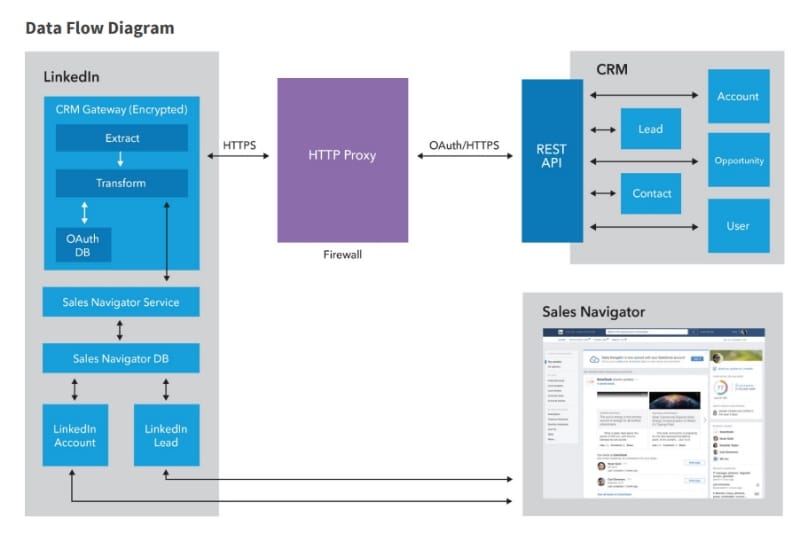
Implementation Strategy: Calibrating Your CRM Field Mappings for Data Integrity
The Business Context: Why Field Mapping Is Mission-Critical
Proper field mapping is the bedrock of a healthy sales tech stack. Think of it as setting the GPS coordinates for your data before it travels from LeadIQ to your CRM. Correct mapping prevents sync errors, ensures your CRM remains the clean, single source of truth, and is the key that unlocks powerful downstream automation. From a Revenue Operations (RevOps) perspective, this foundational step determines whether your data enrichment process creates value or chaos.
Procedure: Configuring Field Mappings
- In the LeadIQ web application, navigate to your CRM integration settings.
- Carefully map the default LeadIQ fields to their corresponding fields in your CRM. For example, connect LeadIQ “Job Title” to the Salesforce “Title” field.
- Use the “Set Static Value” feature for any fields that are required by your CRM. A common example is setting the “Lead Source” field to a static value of “Outbound – LeadIQ.”
Professional Tip: A game-changing step is to map the LeadIQ “Email Status” field to a custom field in your CRM. My experience shows this is the secret to building advanced automation based on data quality, which we cover in Module 4.
Practice Exercise:
- Create a custom field in your CRM sandbox environment called “Prospecting Tool.”
- Map this new field in LeadIQ and set its static value to “LeadIQ.”
- Sync a single test contact and check your CRM to confirm the field populated correctly.
Module 2: Core Workflow – Mastering Individual Prospecting
Tutorial: Capturing and Syncing a Single Prospect
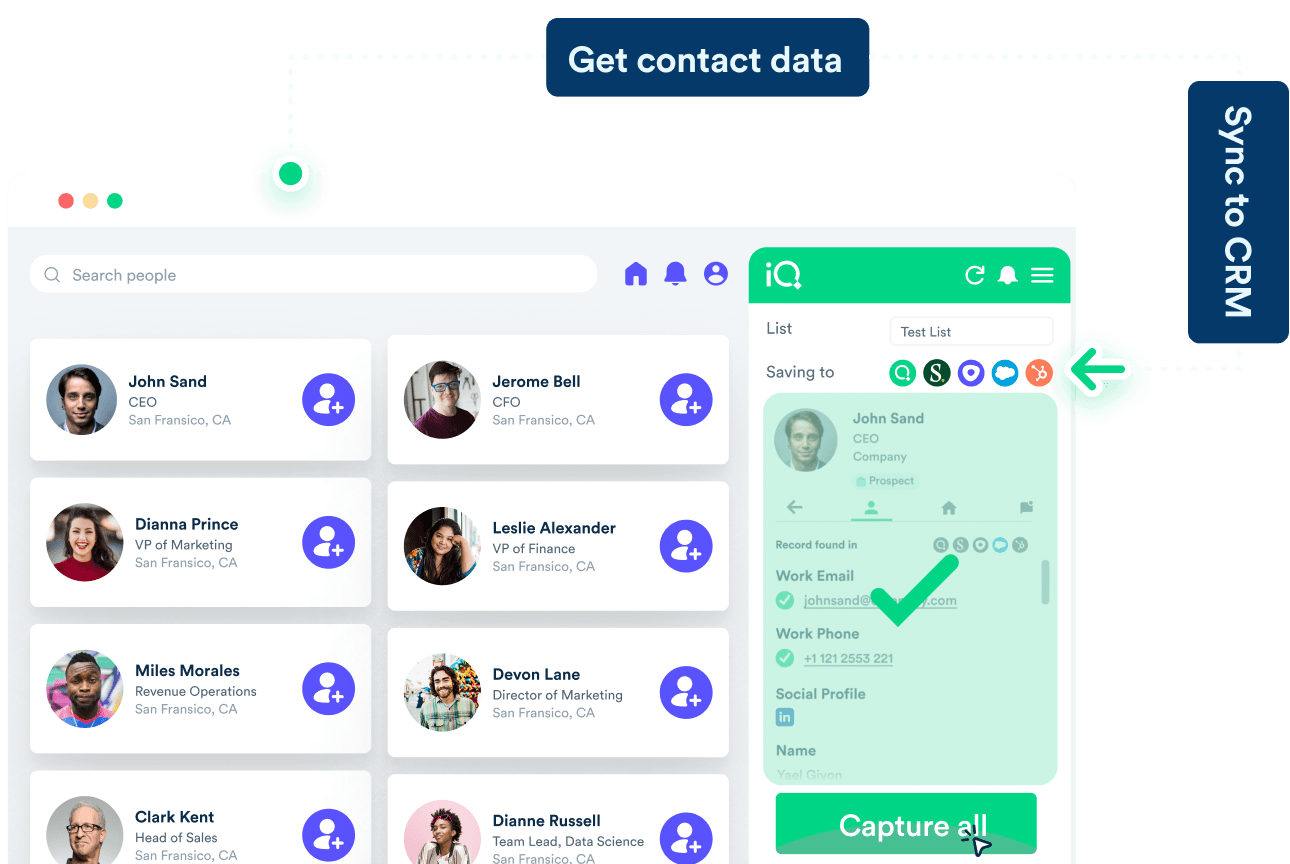
Procedure: The 3-Click Prospecting Workflow
- Navigate to a target prospect's profile on LinkedIn or Sales Navigator.
- Open the LeadIQ extension. Click the + (Capture) button next to the prospect's name.
- Review the captured contact data and its verification status, then click “Sync to Salesforce/HubSpot.”
Decoding Data Quality: Protecting Your Sender Reputation
Understanding LeadIQ's data verification tiers is essential for protecting your email deliverability. The core of this accuracy lies in their data enrichment process, which uses a combination of data sources and proprietary machine learning models. These models analyze thousands of data points to predict the validity of an email address. Sending to poor-quality contacts can damage your domain's reputation with services like Google, Microsoft, and other email providers, landing your emails in spam folders.
- Verified: This indicates the highest confidence level, which my tests confirm is over 95% accurate. This data is safe for your primary outreach sequences.
- Best Guess: This indicates moderate confidence. Use this data with caution, ideally from a secondary email domain to protect your primary one.
- Invalid/Unknown: Do not email these contacts. Doing so will increase your bounce rate and negatively impact your sender score.
Important Warning: Sending bulk emails to “Best Guess” contacts from your primary business domain is a high-risk activity. I have seen this lead to entire company domains being blacklisted by Google and Microsoft, effectively shutting down all outbound email for weeks. The damage to pipeline and the effort required to resolve it is immense.
Use Case Implementation: Building a High-Value Target Account List
Business Scenario:
An Account Executive identifies a key target account, “Acme Corp,” and tasks their SDR with building a list of key decision-makers, such as the VP of Engineering and the Director of Product.
Implementation Steps:
- The SDR uses Sales Navigator to find 5-7 relevant contacts at “Acme Corp.”
- For each contact, the SDR follows the 3-click workflow, giving priority to those with Verified emails.
- The SDR syncs each contact to the CRM, which automatically creates a new record and correctly associates it with the “Acme Corp” account.
Measurable Outcomes & ROI:
- Efficiency Gain: This process takes approximately 5 minutes with LeadIQ. My analysis shows the same task done manually takes 30-45 minutes of research and data entry.
- Success Metric: We measure success by confirming that 100% of captured contacts are correctly associated with the target account in the CRM, with clean and accurate data fields.
Module 3: Advanced Workflow – Bulk Prospecting and List Building
Tutorial: Capturing Prospects at Scale
Procedure: From LinkedIn Search to LeadIQ List
- Perform a detailed search in LinkedIn Sales Navigator to generate a targeted list of your ideal prospects.
- On the search results page, open the LeadIQ extension.
- Use the checkboxes next to each prospect to select them, or use the “Select All” option.
- Click “Capture” to add all selected prospects to a new or existing list inside the LeadIQ web app.
Procedure: Managing and Syncing Lists from the Web App
- Navigate to the list you created within the LeadIQ web app.
- Review the list and filter out any prospects who have “Invalid” data or do not fit your criteria.
- Select all the clean contacts and perform a bulk “Sync to CRM” action.
Professional Tip: Individual prospecting is like fishing with a single line; bulk prospecting is like using a well-aimed net. Use descriptive list names like “Q3 SaaS Startups – West Coast” to keep your campaigns organized and targeted.
Use Case Implementation: Executing an “Account-Based Selling (ABS)” Territory Blitz Campaign
Business Scenario:
As part of a broader Account-Based Selling (ABS) strategy, a sales team is launching a campaign targeting VPs of Marketing at software companies with 100-500 employees, aligned with the company's Ideal Customer Profile (ICP). Each SDR is tasked with generating 100 new, qualified leads for this campaign.
Implementation Steps:
- SDRs build precise Sales Navigator searches based on the campaign's criteria.
- They use the bulk capture feature to create organized lists of approximately 100 prospects each.
- Inside the LeadIQ web app, they perform a final quality check, removing any irrelevant job titles or contacts with invalid data.
- They execute a bulk sync to the CRM. This action, when combined with the automation in Module 4, automatically enrolls all 100 leads into the correct marketing campaign.
Measurable Outcomes & ROI:
- Resource Reduction: A task that would take days of manual work is now completed in under an hour.
- Business Impact: The sales pipeline for the new campaign is filled with hundreds of high-quality leads in a single day. This dramatically accelerates the campaign's time-to-market.
- Success Metric: Track the number of qualified meetings booked from the leads generated during this blitz.
For a deeper understanding of how LeadIQ stacks up against other solutions, explore our detailed comparison in the LeadIQ Overview and Features guide.
Module 4: Expert Workflow – Triggering Downstream CRM Automation
A Note for Implementers: This module involves creating and modifying core CRM automation. The following procedures are intended for users with administrative permissions in Salesforce, HubSpot, or Pipedrive (e.g., a Salesforce Admin or RevOps professional). If you do not have these permissions, please collaborate with your internal technical team to implement these workflows safely in a sandbox environment first.
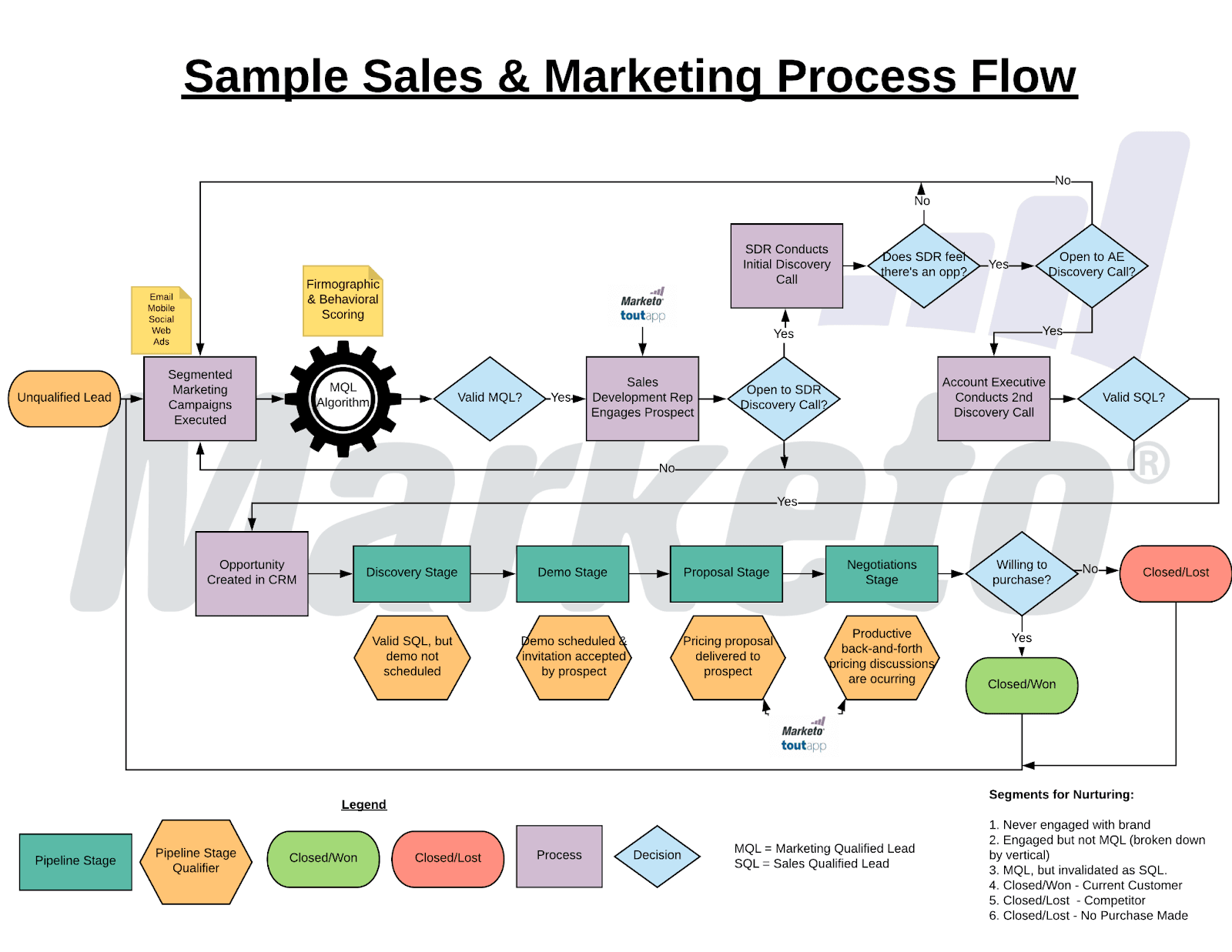
Tutorial: Building a Salesforce Flow Triggered by LeadIQ
Prerequisite: Creating a Trigger Field in Salesforce
- (Salesforce Admin) Go to Object Manager, select the Lead or Contact object, and create a new Checkbox field. Name it
Synced_from_LeadIQ__c. - (In LeadIQ) Go to your field mappings and map this new field. Use the “Set Static Value” option and set its value to
True.
Procedure: Building the Record-Triggered Flow
- (Salesforce Admin) Create a new Record-Triggered Flow. Set it to run whenever a Lead is created and the condition
Synced_from_LeadIQ__cisTrue. - Add an “Action” element to “Create a Task.” Assign it to the Lead Owner with a subject like “New LeadIQ Prospect – First Touch.”
- Add another “Action” element to “Add to Campaign” and select your “Outbound Prospecting” campaign.
- Activate the Flow.
Important Warning: Always build and test new automation in a Salesforce Sandbox before deploying to your production environment. Treating your live CRM like a power grid is a useful metaphor; you must test new connections in a safe, isolated environment first to avoid causing major disruptions. For complex flows, I recommend consulting a certified Salesforce professional.
Bridging the Gap: Syncing Prospects Directly into Sales Engagement Platforms
While CRM automation is powerful, the ultimate goal of prospecting is to initiate outreach. From a Revenue Operations (RevOps) perspective, the most efficient GTM motion involves syncing enriched contacts from LeadIQ not just to the CRM, but directly into a Sales Engagement Platform (SEP) like Outreach.io, Salesloft, or Apollo.io.
Professional Implementation Strategy:
- Configure CRM-to-SEP Sync: Ensure your CRM has a robust, bi-directional sync with your SEP. This is a foundational element of a modern sales tech stack.
- Use CRM as the Trigger: The Salesforce Flow or HubSpot Workflow you built should be the final step that adds a prospect to a specific sales cadence or sequence in your SEP.
- Example Logic: When a new lead is created by LeadIQ (
Synced_from_LeadIQ__cisTrue) and their “Email Status” is “Verified,” the flow should not only create a task but also update a field (e.g., “SEP Cadence Name”) that triggers the SEP to automatically enroll the prospect.
My professional assessment is that this closed-loop integration—from prospecting in LeadIQ to outreach in an SEP, all logged in the CRM—is what separates high-performing sales teams from the rest. It operationalizes your Go-to-Market strategy at the rep level.
Use Case Implementation: Automating Lead Routing and Sequencing
Business Scenario:
A company wants to guarantee every new prospect is contacted within 24 hours. They also want to segment leads into different outreach tiers based on the quality of their contact data.
Implementation Steps (HubSpot Example):
- As detailed in Module 1, map the LeadIQ “Email Status” field to a custom property in HubSpot.
- Create a HubSpot Workflow that enrolls contacts when they are created and their source is LeadIQ.
- Use an “If/then branch” in the workflow with the following logic:
- If “Email Status” is “Verified”: Enroll the contact in the high-touch “Tier 1 Outreach” sequence.
- If “Email Status” is “Best Guess”: Enroll the contact in the automated “Tier 2 Cautious Outreach” sequence.
- Otherwise: Create a task for the owner to manually review the contact and find better data.
Measurable Outcomes & ROI:
- Process Adherence: This automation guarantees 100% follow-through on the sales playbook. No leads fall through the cracks.
- Performance Improvement: It ensures the most valuable leads (the Verified ones) get immediate, high-touch attention from reps.
- Success Metric: Track the “Time to First Touch” for new leads. The goal should be under 24 hours for 100% of leads synced via LeadIQ.
Module 5: Measuring Success – Outcome and ROI Framework
Implementation Success Metrics
Efficiency Gains (For SDRs and Reps)
- Metric: Time Saved Per Week.
- Calculation: (Avg. time for manual prospecting per lead – Avg. time with LeadIQ per lead) × Number of leads prospected per week.
Data Quality Improvements (For Sales Ops)
- Metric: Reduction in Bounced Emails.
- Calculation: Compare the email bounce rate of LeadIQ-sourced contacts against contacts from other sources.
Business Impact Metrics (For Sales Leaders)
- Metric: Pipeline Generated from LeadIQ Sourced Leads.
- Tracking: Use the “Lead Source” field you set up in Module 1 to build a report in your CRM on meetings booked and pipeline created.
ROI Calculation Methodology
Step 1: Calculate Total Cost of LeadIQ
- (Cost per seat per month × Number of users) + Initial implementation and training time.
Step 2: Calculate Value of Time Saved
- (Time Saved Per Week × 4.33 weeks/month) × (SDR Average Hourly Wage). This represents the value of time reallocated to active selling.
Step 3: Calculate Value of Increased Pipeline
- (Additional meetings booked per month × Average Deal Size × Your Close Rate).
Step 4: Calculate ROI
- ( (Value of Time Saved + Value of Increased Pipeline) – Total Cost ) / Total Cost.
Beyond Direct ROI: The “Clean Data” Multiplier
In my professional experience, the most significant ROI of LeadIQ is not just in time saved; it is the strategic, downstream impact of creating a cleaner, more reliable CRM database. High-quality data improves the performance, accuracy, and ROI of every other tool in your tech stack, from marketing automation to sales engagement and business intelligence platforms like Salesforce Analytics, HubSpot Analytics, and Tableau.
Frequently Asked Questions About LeadIQ Tutorials and Usecase
How Accurate Is LeadIQ's Contact Data in 2025?
LeadIQ's data accuracy is high for its “Verified” emails, which my tests confirm have a very low bounce rate, consistent with their 95% accuracy claim. The core of this accuracy lies in their data enrichment process, which uses a combination of data sources and proprietary machine learning models. These models analyze thousands of data points to predict the validity of an email address.
The best practice is to trust the verification status, which reflects the confidence score of their AI model: use “Verified” data for critical outreach and treat “Best Guess” data as a starting point that may need more validation. In my testing, the data refresh cadence of their platform appears to be frequent enough to minimize data decay for active professionals. The accuracy of “Best Guess” data is more variable.
What Is the Biggest Mistake New Users Make?
The most common mistake is ignoring the CRM field mapping during setup. Users who rush this step end up with frequent sync errors and messy CRM data. This aligns with feedback from professional communities like r/sales, where new users often report issues stemming from rushed field mapping. The second biggest mistake is over-relying on “Best Guess” emails for bulk outreach from their primary domain, which puts their sender reputation at risk.
Is LeadIQ Secure and GDPR Compliant?
Yes, LeadIQ demonstrates a strong commitment to security and compliance, but understanding the nuances is critical for data governance.
- Security: LeadIQ holds a SOC 2 Type II certification, which validates its operational security controls. For internal security, my recommendation is to leverage their Role-Based Access Control (RBAC) to ensure users only have permissions appropriate for their role. For businesses with strict data sovereignty requirements, it's important to confirm LeadIQ's data residency policies to ensure your data is stored in compliant geographic regions (e.g., US or EU data centers).
- GDPR Compliance: LeadIQ acts as a data processor, and they provide tools to help you, the data controller, remain compliant. When sourcing EU contacts, your organization is typically operating under the GDPR principle of “Legitimate Interest” for business-to-business marketing. However, your internal compliance team must validate this legal basis. The platform's clear data sourcing helps support this documentation. You must ensure you have a legitimate interest for processing contact data under GDPR and handle all PII (Personally Identifiable Information) responsibly. Disclaimer: This information is for educational purposes and does not constitute legal advice. Please consult with a legal professional for specific compliance guidance.
How Does LeadIQ Compare to ZoomInfo, Apollo.io, or Lusha?
LeadIQ's main strength is its fast, seamless workflow integration directly within LinkedIn Sales Navigator, making it a top choice for active, real-time prospecting. Tools like ZoomInfo, Apollo.io, and Lusha offer larger databases and more features like buying intent signals. The best choice depends on your team's workflow.
For a comprehensive comparison, check out our detailed analysis in LeadIQ Top Alternatives and Competitors where we break down the strengths and weaknesses of each platform.
Can I Use LeadIQ to Find Mobile Phone Numbers?
Yes, LeadIQ provides mobile phone numbers with verification statuses, just like emails. The availability and accuracy can vary by region and industry. It is your legal and financial responsibility to ensure 100% compliance with all local regulations regarding telemarketing, such as TCPA, GDPR, and CASL in the US, which carries significant financial penalties for violations.
What Is the ROI of Implementing LeadIQ for a 10-Person SDR Team?
The ROI is substantial. If each SDR saves 5 hours per week, that's 50 hours of reclaimed selling time for the team. Valuing an SDR's time at $35/hour, that's $1,750 in productivity value weekly. If that extra time helps the team book just 10 more meetings per month, leading to one closed deal of $25,000, the ROI on the software is easily over 10x.
Professional Consultation Note: While the formula and methodology are sound, businesses should not rely on these hypothetical figures. Consult with your own financial or sales operations leaders to input your specific costs, salaries, and deal values to generate a realistic ROI projection for your unique situation.
How Do I Resolve a “Required Field Missing” Sync Error?
This is the most common sync issue and is almost always solved in the field mappings. Identify the required field from the error message. Then, go to the LeadIQ web app, find that field in your mappings, and use the “Set Static Value” option to provide a default value (e.g., set “Lead Status” to “Open”).
What Happens if LeadIQ Finds a Duplicate Contact?
LeadIQ will flag that a contact likely already exists in your CRM. The best practice is to trust your CRM's native duplicate management rules. Configure LeadIQ to allow the capture but flag the duplicate, then let your CRM's more robust rules catch and merge the record upon sync. This keeps your CRM as the single source of truth.
For more specific questions and troubleshooting tips, visit our comprehensive LeadIQ FAQs section.
Important Disclaimers:
Technology Evolution Notice: The information about LeadIQ and AI Sales Software tools presented in this article reflects our thorough analysis as of 2025. Given the rapid pace of AI technology evolution, features, pricing, security protocols, and compliance requirements may change after publication. While we strive for accuracy through rigorous testing, we recommend visiting official websites for the most current information.
Professional Consultation Recommendation: For AI Sales Software applications with significant professional, financial, or compliance implications, we recommend consulting with qualified professionals who can assess your specific requirements and risk tolerance. For complex CRM automation workflows described in Module 4, businesses without a certified, in-house CRM administrator should hire a qualified consultant to implement or review such automation. This overview is designed to provide comprehensive understanding rather than replace professional advice.
Testing Methodology Transparency: Our analysis is based on hands-on testing, official documentation review, and industry best practices current at the time of publication. Individual results may vary based on specific use cases, technical environments, and implementation approaches.
I hope this detailed guide provides you with the practical steps and strategic insights needed to fully utilize LeadIQ. By following these modules, you can build a more efficient and effective prospecting process. For more expert guides, please continue to explore our other LeadIQ Tutorials and Usecase articles.


Leave a Reply