Is Apollo.io the Right AI Sales Tool for Your Team?
This 2-Minute Quiz Reveals Your Perfect Match!
Key Takeaways
- AI-Powered Sales Platform: Apollo.io combines a 265M+ contact database with AI-driven engagement tools for personalized outreach at scale
- Free Plan Available: Apollo offers a genuine free tier with 60 mobile credits, 120 export credits, and 10,000 email credits bonus
- Data Quality & Compliance: Offers 85-95% deliverability rates with GDPR/CCPA compliance features and multi-source data verification
- ROI-Focused Investment: Typical implementations deliver 3-5x ROI within the first year through improved pipeline generation and sales productivity
What is Apollo.io and how does it use AI for sales?
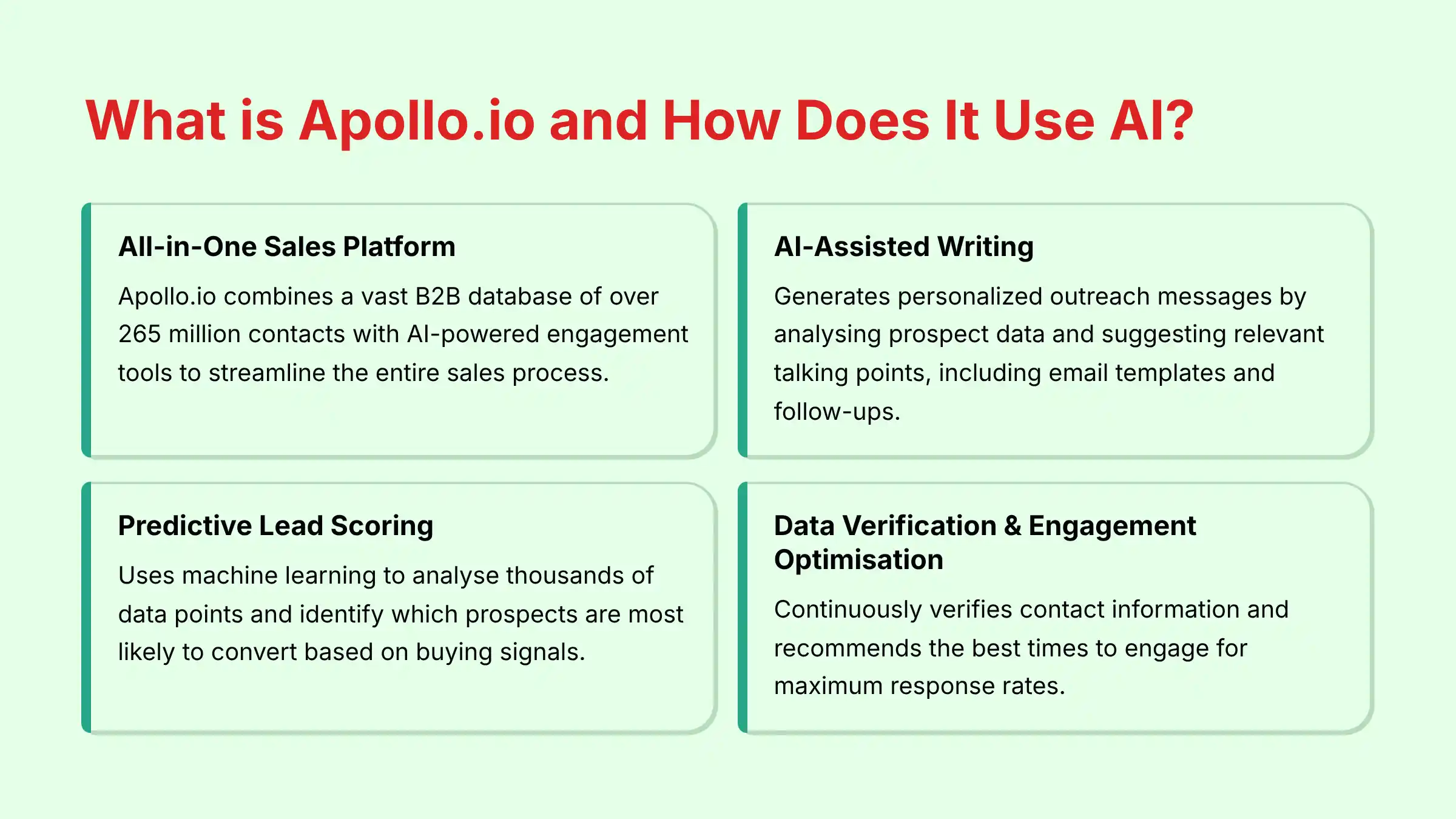 Apollo.io is an all-in-one sales intelligence and engagement platform designed to help sales teams find, contact, and convert their ideal customers. At its core, Apollo combines a vast B2B database of over 265 million contacts with AI-powered engagement tools to streamline the entire sales process.
The AI functionality in Apollo.io works across several key areas:
Apollo.io is an all-in-one sales intelligence and engagement platform designed to help sales teams find, contact, and convert their ideal customers. At its core, Apollo combines a vast B2B database of over 265 million contacts with AI-powered engagement tools to streamline the entire sales process.
The AI functionality in Apollo.io works across several key areas:
- AI-assisted writing and personalization: Apollo's AI helps sales reps craft personalized outreach messages at scale by analyzing prospect data and suggesting relevant talking points. The platform can generate email templates, subject lines, and follow-up messages that sound natural and resonate with specific prospect segments.
- Predictive lead scoring and intent signals: The platform uses machine learning algorithms to analyze thousands of data points and identify which prospects are most likely to convert. This includes tracking buying signals like website visits, content downloads, or technology changes that indicate purchase readiness.
- Data verification and enrichment: Apollo's AI continuously works to maintain data accuracy by verifying email addresses, updating contact information when people change roles, and enriching profiles with relevant firmographic and technographic details.
- Engagement optimization: The AI analyzes response patterns and recommends the best times to send emails, make calls, or engage on social media for maximum response rates.
Is there a free version of Apollo.io?
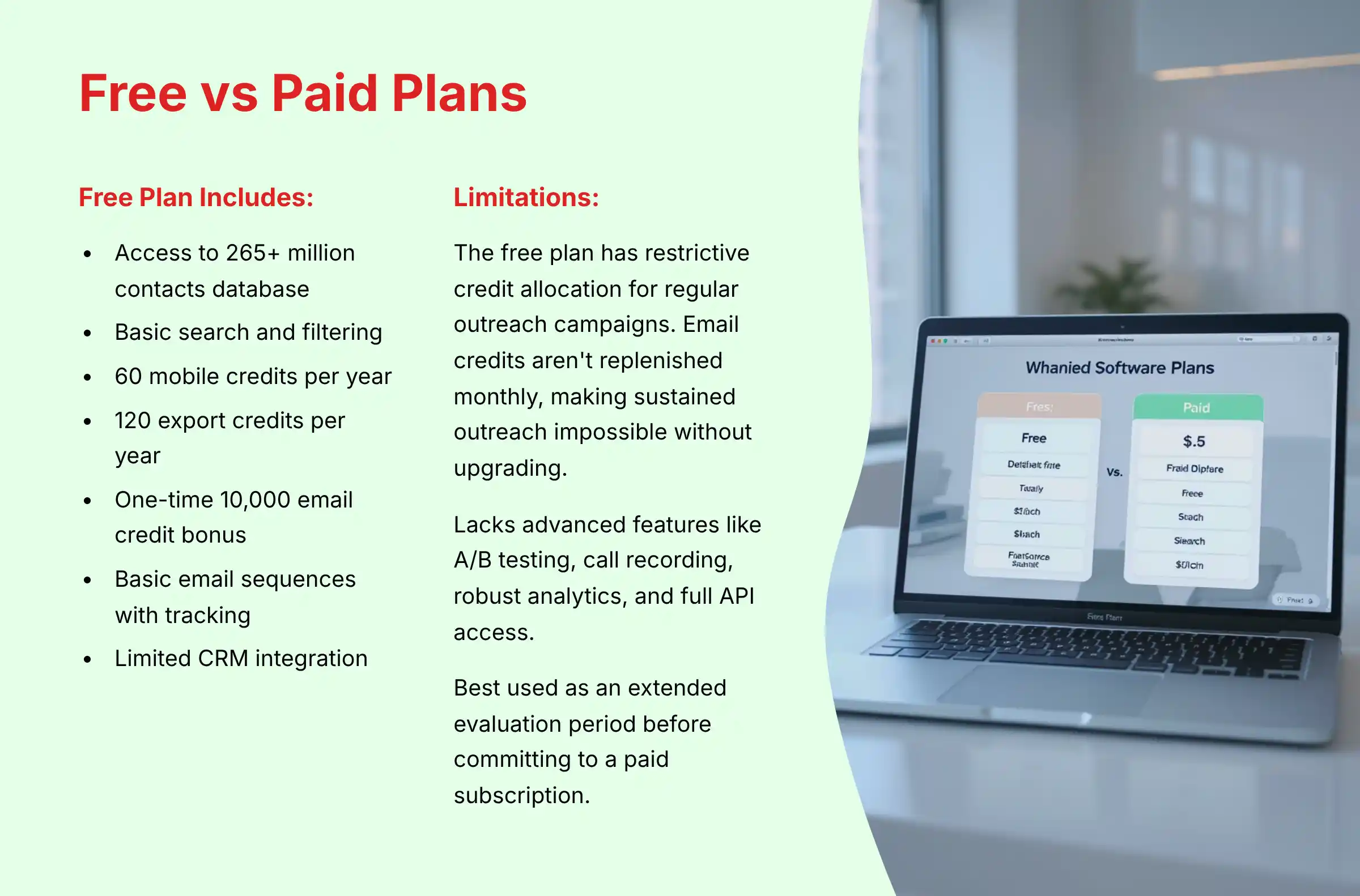 Yes, Apollo.io offers a genuinely useful free plan that provides substantial value for individual sales professionals or small teams exploring AI-powered sales tools. This free tier gives users access to the core platform functionality with specific limitations.
The free plan includes:
Yes, Apollo.io offers a genuinely useful free plan that provides substantial value for individual sales professionals or small teams exploring AI-powered sales tools. This free tier gives users access to the core platform functionality with specific limitations.
The free plan includes:
- Access to Apollo's database of 265+ million contacts
- Basic search and filtering capabilities
- 60 mobile credits per year (for revealing direct-dial phone numbers)
- 120 export credits per year (for exporting contact information)
- A one-time bonus of 10,000 email credits upon signup (for sending emails)
- Basic email sequences with open and click tracking
- Limited CRM integration functionality
Where does Apollo.io get its data from?
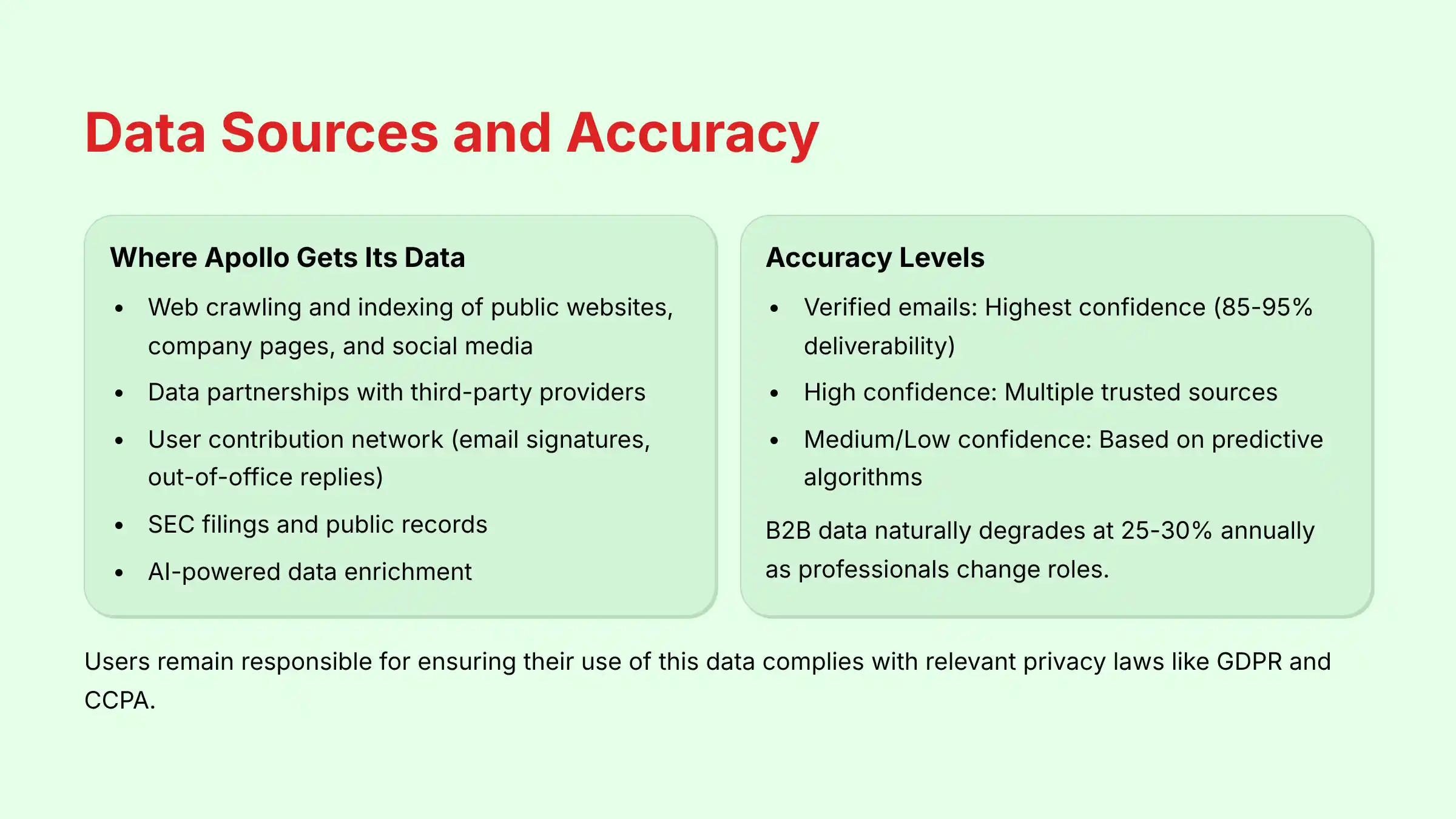 Apollo.io aggregates its massive B2B database from multiple sources using a comprehensive data collection and verification strategy. Understanding these sources is crucial for sales professionals concerned about data quality and compliance.
The platform's data collection methods include:
Apollo.io aggregates its massive B2B database from multiple sources using a comprehensive data collection and verification strategy. Understanding these sources is crucial for sales professionals concerned about data quality and compliance.
The platform's data collection methods include:
- Web crawling and indexing: Apollo's algorithms continuously scan millions of public websites, company pages, social media profiles (particularly LinkedIn), press releases, and news articles to extract professional information. This includes job titles, company details, and professional accomplishments.
- Data partnerships and third-party providers: Apollo licenses information from reputable data providers who specialize in specific industries or regions, expanding their coverage while maintaining quality standards.
- User contribution network: A significant portion of Apollo's data comes from its community-based model. When users connect their email accounts or CRMs, Apollo can analyze email signatures, out-of-office replies, and contact records to verify and update information in its database.
- SEC filings and public records: For company information, Apollo incorporates data from official government sources like SEC filings, business registrations, and other public records that provide accurate firmographic details.
- AI-powered data enrichment: Apollo uses machine learning to analyze patterns across multiple data sources, filling gaps and making intelligent predictions about missing information.
How accurate is the contact and company data in Apollo.io?
Data accuracy is the cornerstone of effective sales outreach, and Apollo.io has established a solid reputation in this area while acknowledging the inherent challenges of B2B data management. The platform advertises high accuracy rates but provides important transparency about the verification status of each contact. Apollo.io classifies contact information in several verification tiers:- Verified emails: These have undergone deliverability checks through Apollo's verification system and have the highest confidence score.
- High confidence: These are derived from multiple trusted sources but haven't been directly verified.
- Medium/Low confidence: These are based on predictive algorithms and patterns but carry higher risk.
- Prioritize verified and high-confidence contacts
- Use the recency filters to target recently updated records
- Implement a third-party email verification service before major campaigns
- Maintain proper list hygiene by regularly removing bounced contacts
- Use Apollo's data enrichment features to continuously update your existing database
How does Apollo.io integrate with CRMs like Salesforce and HubSpot?
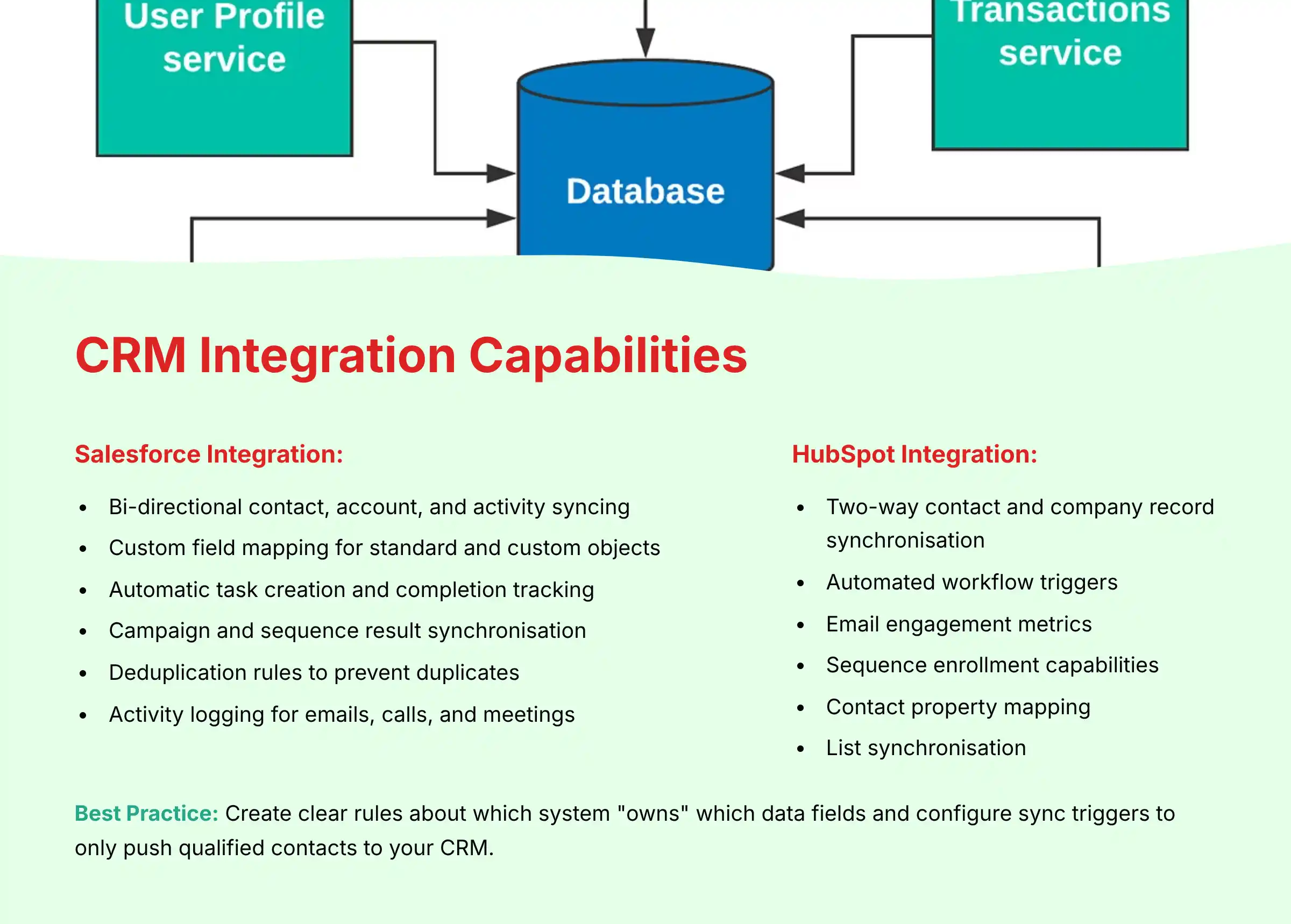 Apollo.io offers robust bi-directional integrations with major CRM platforms, particularly Salesforce and HubSpot, enabling sales teams to maintain their CRM as the single source of truth while leveraging Apollo's prospecting and engagement capabilities.
The integration functionality includes:
For Salesforce integration:
Apollo.io offers robust bi-directional integrations with major CRM platforms, particularly Salesforce and HubSpot, enabling sales teams to maintain their CRM as the single source of truth while leveraging Apollo's prospecting and engagement capabilities.
The integration functionality includes:
For Salesforce integration:
- Bi-directional contact, account, and activity syncing
- Custom field mapping for both standard and custom objects
- Automatic task creation and completion tracking
- Campaign and sequence result synchronization
- Deduplication rules to prevent creating duplicate records
- Activity logging for emails, calls, and meetings directly to Salesforce
- Ability to enrich existing Salesforce records with Apollo data
- Two-way contact and company record synchronization
- Automated workflow triggers based on Apollo activities
- Email engagement metrics pushed to HubSpot
- Sequence enrollment capabilities directly from HubSpot
- Contact property mapping between platforms
- List synchronization for targeted campaigns
- Create clear rules about which system “owns” which data fields
- Configure sync triggers to only push qualified contacts to your CRM
- Regularly audit the integration to ensure proper data flow
- Use Apollo's native duplicate prevention settings
Is Apollo.io compliant with GDPR and CCPA?
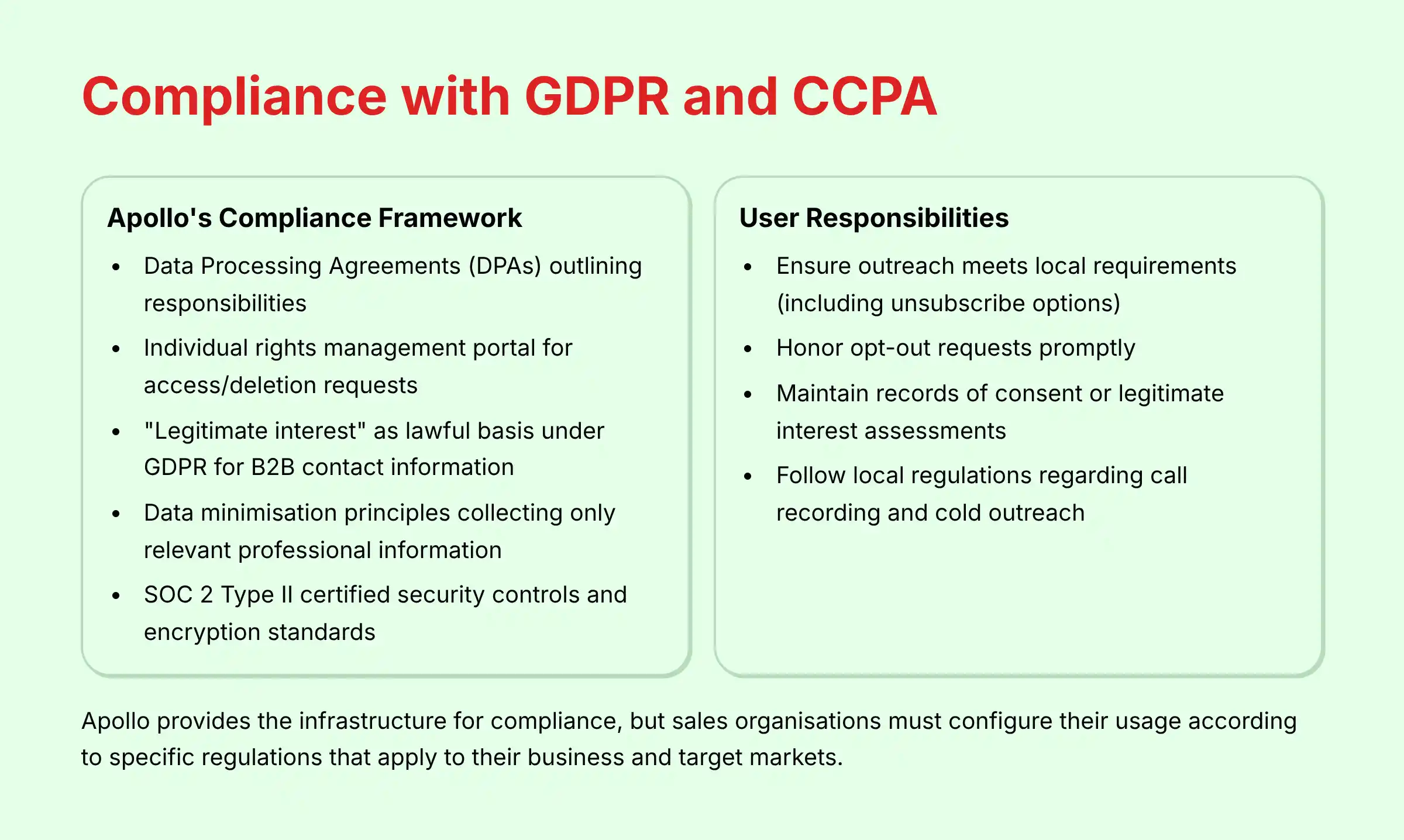 Yes, Apollo.io maintains compliance with major data privacy regulations including GDPR (European Union), CCPA (California), and other international privacy frameworks. As a data processor that handles substantial personal information, Apollo has implemented comprehensive compliance measures.
Apollo.io's compliance framework includes:
Yes, Apollo.io maintains compliance with major data privacy regulations including GDPR (European Union), CCPA (California), and other international privacy frameworks. As a data processor that handles substantial personal information, Apollo has implemented comprehensive compliance measures.
Apollo.io's compliance framework includes:
- Data Processing Agreements (DPAs): Apollo provides standardized DPAs for customers that outline the responsibilities of both parties regarding data protection, processing limitations, and security requirements.
- Individual rights management: The platform maintains a dedicated privacy portal where individuals can exercise their rights to access, correct, or delete their personal information from Apollo's database, fulfilling GDPR Article 15-17 requirements.
- Lawful basis documentation: For B2B contact information, Apollo relies primarily on “legitimate interest” as the lawful basis under GDPR, which is appropriate for business-related communications when balanced against the individual's privacy rights.
- Data minimization principles: Apollo collects only professional information relevant to B2B sales and marketing purposes, avoiding unnecessary personal data collection.
- Security measures: The platform implements SOC 2 Type II certified security controls, encryption standards, and access restrictions to protect personal data from unauthorized access.
- Ensure their own outreach meets local requirements (like including unsubscribe options)
- Honor opt-out requests promptly
- Maintain records of consent or legitimate interest assessments
- Follow local regulations regarding call recording and cold outreach
What is the real cost of Apollo.io's paid plans?
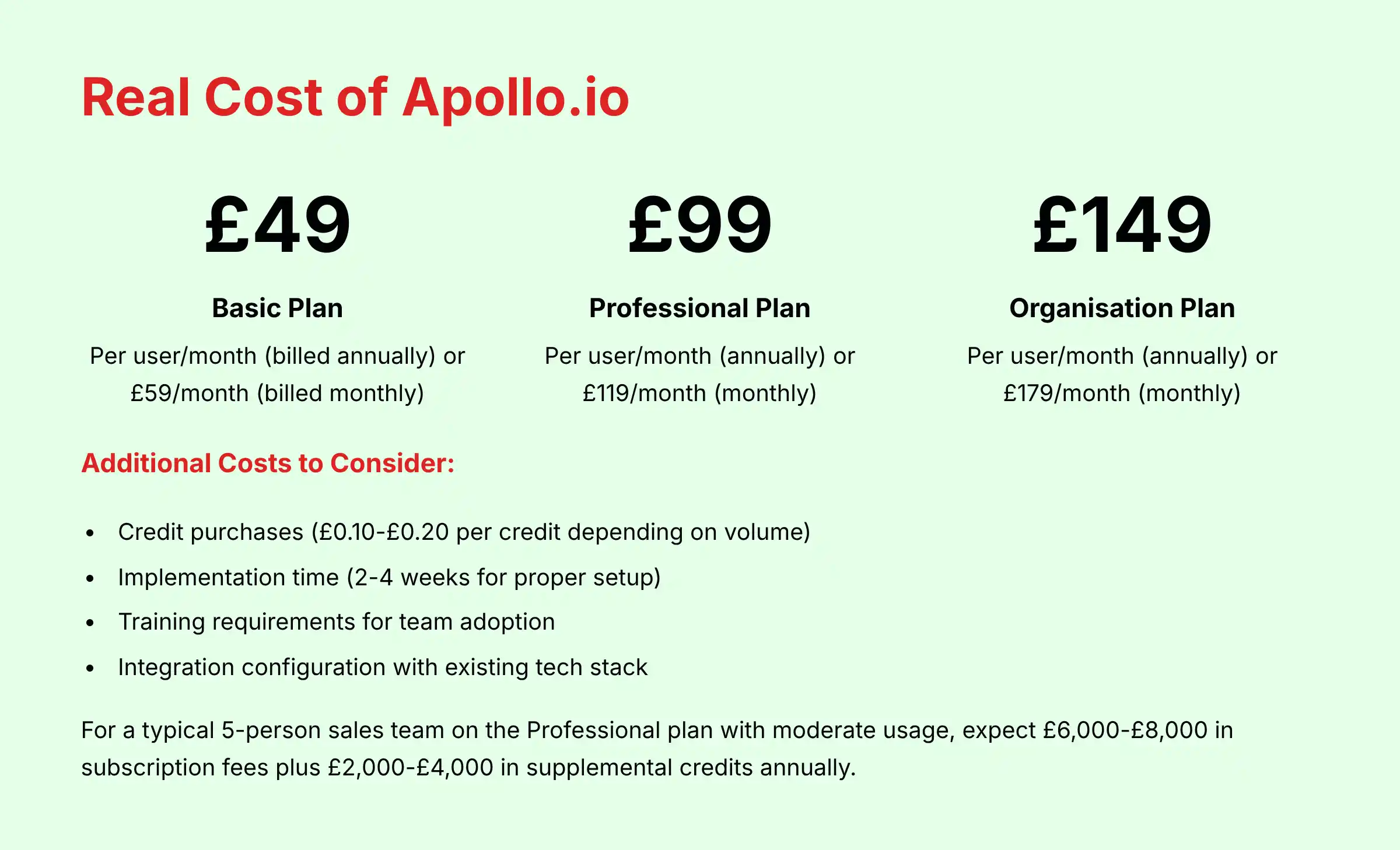 Understanding the complete cost structure of Apollo.io requires looking beyond the advertised monthly prices to calculate the total cost of ownership based on your specific usage patterns and team requirements.
Apollo.io's pricing model consists of several components:
Base Subscription Tiers:
Understanding the complete cost structure of Apollo.io requires looking beyond the advertised monthly prices to calculate the total cost of ownership based on your specific usage patterns and team requirements.
Apollo.io's pricing model consists of several components:
Base Subscription Tiers:
- Basic Plan: Starting around $49/user/month (billed annually) or $59/month (billed monthly)
- Professional Plan: Starting around $99/user/month (annually) or $119/month (monthly)
- Organization Plan: Starting around $149/user/month (annually) or $179/month (monthly)
- Enterprise Plan: Custom pricing based on specific requirements
- Email Credits: Used when sending emails through Apollo
- Mobile Credits: Used to reveal direct-dial phone numbers
- Export Credits: Used when exporting contact information
- Annual vs. Monthly Billing: The annual discount (approximately 15-20%) provides significant savings for established teams with predictable usage.
- Seat Allocation Planning: Carefully assess which team members need full licenses versus view-only access.
- Credit Management: Implement internal policies on credit usage to prevent unnecessary consumption.
- Plan Selection: The Professional plan typically offers the best value for most sales teams, providing essential features like advanced sequencing, A/B testing, and call recording.
- Implementation time (typically 2-4 weeks for proper setup)
- Training requirements for team adoption
- Integration configuration with existing tech stack
- Potential need for additional verification services
How do you set up an effective cold outreach sequence in Apollo.io?
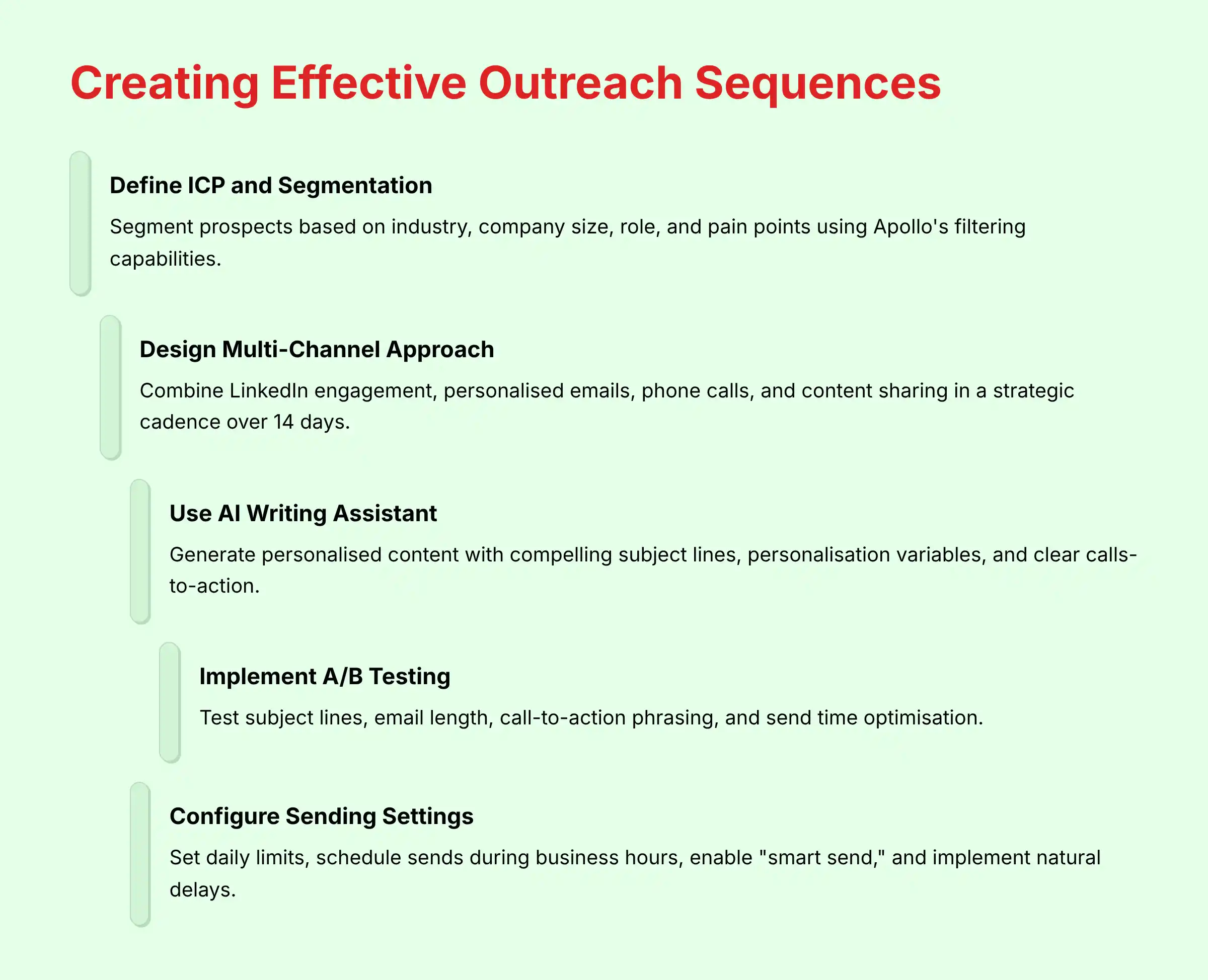 Creating high-performing outreach sequences in Apollo.io requires strategic planning and thoughtful execution. The platform's AI-powered sequencing capabilities enable sophisticated multi-channel campaigns that feel personalized rather than automated.
Step-by-Step Sequence Setup Guide:
Creating high-performing outreach sequences in Apollo.io requires strategic planning and thoughtful execution. The platform's AI-powered sequencing capabilities enable sophisticated multi-channel campaigns that feel personalized rather than automated.
Step-by-Step Sequence Setup Guide:
- Define your ICP and segmentation strategy: Before creating any sequence, segment your prospects based on industry, company size, role, and pain points. Apollo's filtering capabilities allow you to create highly targeted lists for personalized outreach.
- Design a multi-channel approach: Effective sequences leverage multiple touchpoints:
- Day 0: LinkedIn profile view or engagement (manual task)
- Day 1: Personalized initial email focused on value proposition
- Day 3: Follow-up email that references the first message
- Day 5: Phone call attempt followed by a “just tried calling” email
- Day 7: LinkedIn connection request with contextual note
- Day 10: Case study or relevant content share
- Day 14: Final “break-up” email that creates urgency but remains professional
- Leverage Apollo's AI writing assistant: Use the AI to generate personalized content for each step, focusing on:
- Compelling subject lines (keep under 50 characters)
- Personalization variables that reference company news or challenges
- Clear calls-to-action that make responding easy
- Implement A/B testing: For campaigns targeting 100+ prospects, create A/B tests for:
- Subject line variations
- Email length (short vs. detailed)
- Call-to-action phrasing
- Send time optimization
- Configure sending settings:
- Set daily sending limits (50-100 emails per day per user is recommended)
- Schedule sends during business hours in the recipient's time zone
- Enable “smart send” to avoid weekends and non-business hours
- Implement sending delays between steps to appear natural
- Set up tracking and analytics:
- Enable open, click, and reply tracking
- Create custom fields to track sequence performance by segment
- Set goals for key metrics (open rate >25%, reply rate >5%)
- Implement bounce and opt-out handling:
- Configure automatic removal of hard bounces
- Ensure proper processing of unsubscribe requests
- Set up notification alerts for high bounce rates
How can you measure ROI when using Apollo.io for sales prospecting?
Measuring the return on investment from Apollo.io requires establishing clear metrics that connect prospecting activities to revenue outcomes. A structured approach to ROI measurement helps sales leaders justify the platform investment and optimize usage patterns. Key Performance Indicators to Track:- Activity Metrics (Leading Indicators):
- Number of new contacts identified and verified
- Email open rates, reply rates, and positive response rates
- Connect rates for outbound calls
- Connection acceptance rates on LinkedIn
- Meetings scheduled per 100 prospects contacted
- Pipeline Metrics (Middle Indicators):
- Cost per qualified meeting (platform cost ÷ meetings generated)
- Pipeline generated from Apollo-sourced prospects
- Conversion rate from prospect to opportunity
- Average deal size for Apollo-sourced opportunities
- Sales cycle length compared to other lead sources
- Revenue Metrics (Lagging Indicators):
- Closed revenue attributed to Apollo-sourced opportunities
- Win rate for Apollo-sourced deals vs. other channels
- Customer acquisition cost (CAC) for Apollo-generated customers
- Lifetime value (LTV) of customers acquired through Apollo
ROI = [(Revenue Generated - Total Apollo Cost) ÷ Total Apollo Cost] × 100%- Subscription fees (per user × number of users)
- Additional credits purchased
- Implementation and training time (estimated hourly cost)
- Ongoing administration time
- Implement proper tracking:
- Create a specific “Lead Source” value in your CRM for Apollo-generated prospects
- Tag all sequence-generated meetings with source campaign information
- Use UTM parameters for any links included in Apollo sequences
- Establish baseline comparisons:
- Compare results to previous prospecting methods
- Run A/B tests with different data sources when possible
- Calculate time saved vs. manual prospecting methods
- Timeframe considerations:
- Evaluate short-term metrics monthly (activity and meeting generation)
- Assess pipeline impact quarterly
- Measure revenue impact over 6-12 month periods
- Attribution modeling:
- Consider implementing first-touch, last-touch, or multi-touch attribution
- Account for Apollo's role in both prospect identification and engagement
What are the differences between Apollo.io and ZoomInfo?
 Apollo.io and ZoomInfo are leading players in the AI sales intelligence space, but they differ significantly in their approach, pricing model, and ideal use cases. Understanding these differences helps sales leaders make informed decisions based on their specific requirements.
Database Coverage and Quality:
Apollo.io and ZoomInfo are leading players in the AI sales intelligence space, but they differ significantly in their approach, pricing model, and ideal use cases. Understanding these differences helps sales leaders make informed decisions based on their specific requirements.
Database Coverage and Quality:
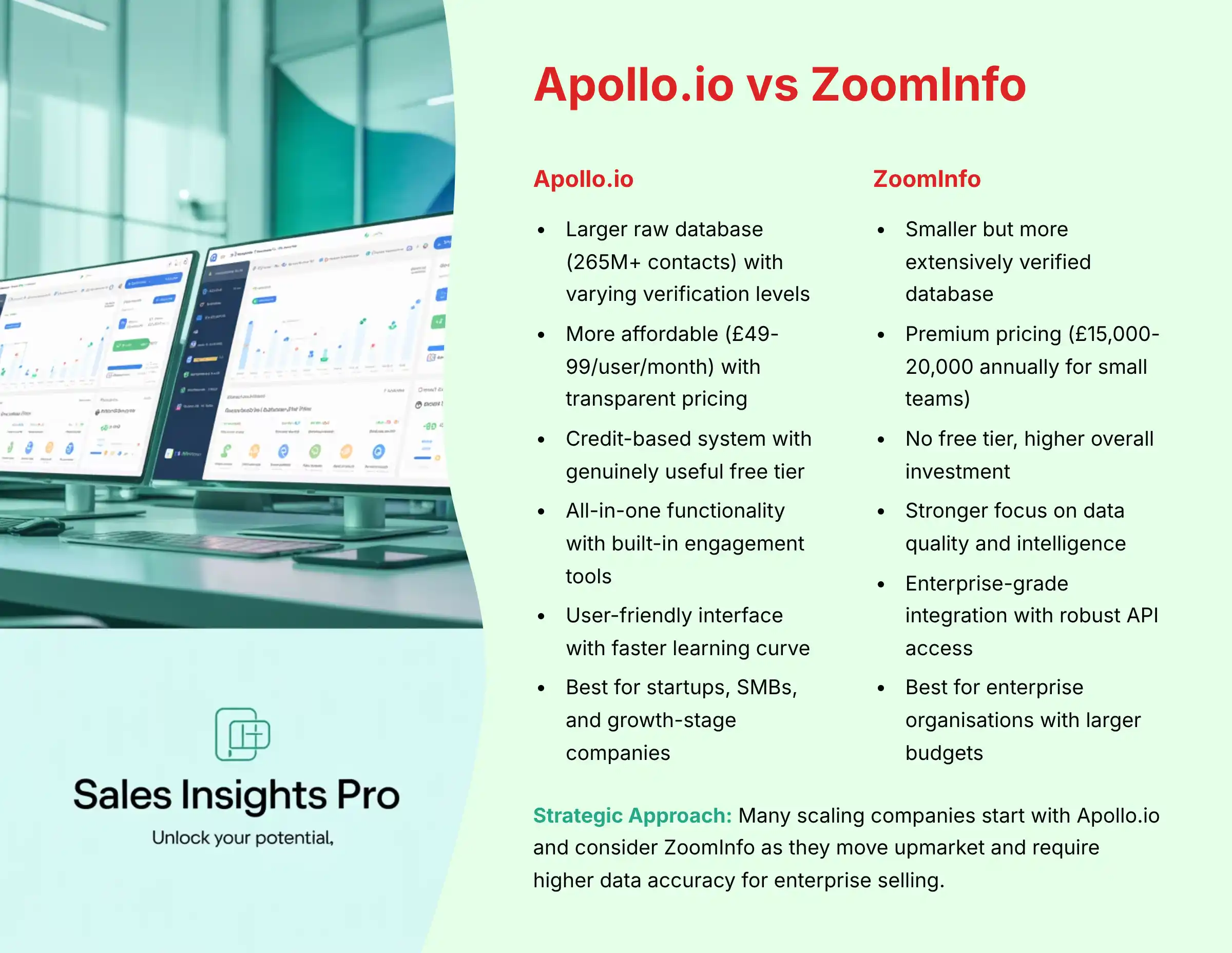
- Apollo.io: Offers a larger raw database (265M+ contacts) with varying verification levels. Provides “verified” tags for higher-confidence data. Stronger in technology, startup, and mid-market sectors.
- ZoomInfo: Smaller but more extensively verified database (focused quality over quantity). Superior data accuracy, particularly for enterprise companies and direct-dial phone numbers. More comprehensive international coverage.
- Apollo.io: Significantly more affordable starting around $49-99/user/month with transparent pricing tiers. Uses a credit-based system for certain actions. Offers a genuinely useful free tier.
- ZoomInfo: Premium pricing starting at $15,000-20,000 annually for small teams, often requiring annual contracts. No free tier, higher overall investment but includes more premium data.
- Apollo.io: Combines prospecting database with built-in engagement tools (email sequences, calling, LinkedIn automation). Greater emphasis on all-in-one functionality.
- ZoomInfo: Stronger focus on data quality and intelligence with more advanced company insights, technographics, and intent data. Engagement features typically require integration with other platforms.
- Apollo.io: More streamlined setup with user-friendly interfaces. Good but less extensive API capabilities. Sufficient for most SMB and mid-market needs.
- ZoomInfo: Enterprise-grade integration capabilities with robust API access and deeper CRM connections. Better suited for complex enterprise environments with custom workflows.
- Apollo.io: Best for startups, SMBs, and growth-stage companies with budget constraints. Excellent for teams that need an all-in-one solution without significant IT support.
- ZoomInfo: Optimal for enterprise organizations with larger budgets who prioritize data accuracy above all else. Suited for companies with established sales operations teams and complex sales motions.
- Apollo.io: Modern, intuitive interface with faster learning curve. More agile development with frequent feature updates.
- ZoomInfo: Comprehensive but more complex interface with steeper learning curve. More established platform with mature, stable features.
How does Apollo.io help with GDPR and CAN-SPAM compliance?
Apollo.io provides several features and frameworks to help sales teams maintain compliance with key regulations like GDPR (Europe), CAN-SPAM (US), and CASL (Canada), though ultimate compliance responsibility remains with the user organization. Compliance-Supporting Features:- Email Opt-Out Management:
- Automatic processing of unsubscribe requests
- Global suppression list management across all team members
- One-click unsubscribe links automatically included in emails
- Compliance with the CAN-SPAM 10-business-day unsubscribe requirement
- GDPR-Specific Capabilities:
- Data subject access request (DSAR) handling through Apollo's privacy portal
- Legitimate interest assessment framework for B2B communications
- Country-specific filtering to exclude protected regions from campaigns
- Documentation support for establishing lawful basis for contact
- Data Management Controls:
- Ability to customize data retention policies
- Automated data minimization tools
- Contact deletion workflows for maintaining data hygiene
- Audit logs of user activity for compliance documentation
- Email Authentication and Sender Reputation:
- SPF, DKIM, and DMARC configuration guidance
- Sending reputation monitoring
- Delivery status tracking and bounce management
- Compliance with sender identification requirements
- Establish geographic boundaries:
- Create filters to exclude prospects in highly-regulated regions if your compliance framework isn't robust
- Set up country-specific templates with appropriate legal language
- Configure proper email settings:
- Ensure physical address is included in email footers (CAN-SPAM requirement)
- Verify all emails clearly identify your company
- Set up proper authentication records (SPF, DKIM) for your sending domain
- Implement internal compliance processes:
- Document your legitimate interest assessment for B2B outreach
- Train team members on compliance requirements
- Establish a process for handling opt-out requests that occur outside the platform
- Regular compliance audits:
- Periodically review unsubscribe handling
- Check that suppression lists are properly maintained
- Verify data retention policies are being enforced
What are Apollo.io credits and how do they work?
Apollo.io uses a credit-based system to manage access to certain high-value data points and actions within the platform. Understanding how these credits work is essential for effective budget management and planning your sales outreach strategy. Types of Apollo Credits:- Email Credits:
- Used when sending emails through Apollo's sequencing platform
- One credit consumed per email sent (including follow-ups)
- Required for tracking opens, clicks, and replies
- The free plan includes a one-time bonus of 10,000 email credits
- Mobile Credits:
- Used to reveal direct-dial phone numbers
- One credit per mobile number revealed
- Higher value for reaching decision-makers directly
- The free plan includes 60 mobile credits annually
- Export Credits:
- Used when exporting contact information to CSV or directly to CRM
- One credit per contact exported
- The free plan includes 120 export credits annually
- Higher paid plans include substantially more export credits
- Basic Plan: Includes monthly credits for all three types
- Professional Plan: Substantially more credits for scaling outreach
- Organization/Enterprise Plans: Highest credit allocation plus team pooling
- Prioritize high-value prospects: Reserve mobile credits for key decision-makers and high-value accounts where direct phone access significantly increases connection rates.
- Leverage the verification system: Focus on contacts with “verified” status to reduce bounce rates and maximize the effectiveness of your email credits.
- Implement team credit policies: Establish guidelines for when to use credits, particularly for large exports or high-volume campaigns.
- Monitor credit utilization: Apollo provides usage dashboards to track consumption patterns and anticipate when additional credits might be needed.
- Consider supplemental credit packages: For teams with inconsistent usage patterns, purchasing supplemental credit packages can be more cost-effective than upgrading the entire subscription tier.
How does Apollo.io's data compare to LinkedIn Sales Navigator?
Apollo.io and LinkedIn Sales Navigator serve complementary but distinct roles in the sales tech stack, with significant differences in their data approach, accessibility, and use cases. Understanding these differences helps sales teams leverage each platform optimally. Data Source and Accessibility:- Apollo.io: Aggregates data from multiple sources including web scraping, third-party providers, and user contributions. Provides direct access to contact details (email, phone) without requiring connection or InMail. Data is exportable and can be used across channels.
- LinkedIn Sales Navigator: Draws exclusively from LinkedIn's proprietary professional network. Offers richer profile information but restricts direct contact information access. Requires connection requests or InMail credits to initiate contact. Limited export capabilities due to LinkedIn's terms of service.
- Apollo.io: Offers more extensive filtering options including technographics (tools used), funding data, employee count changes, and buyer intent signals. Allows creating highly targeted prospect lists based on multiple parameters simultaneously.
- LinkedIn Sales Navigator: Excels at relationship-based filters like degrees of connection, shared connections, and recent profile changes. Provides superior filtering for specific skills, educational background, and career progression.
- Apollo.io: Variable accuracy with verification indicators. Company data is generally reliable, but contact information can decay, particularly for frequently-changing roles. Relies on algorithmic verification and user feedback to maintain quality.
- LinkedIn Sales Navigator: Higher accuracy for current job titles and company affiliations since users typically update their own profiles. Limited visibility into direct contact information means fewer data points to verify.
- Apollo.io: Provides integrated outreach tools including email sequencing, calling, and task management. Enables direct outreach without leaving the platform.
- LinkedIn Sales Navigator: Focuses on social selling through the LinkedIn ecosystem. Offers saved leads, custom lists, and notifications about prospect activities, but requires separate tools for email or call campaigns.
- Use Apollo.io to identify target accounts and build initial prospect lists with contact information
- Cross-reference prospects in Sales Navigator to verify current roles and gather additional context
- Leverage Apollo for direct outreach via email/phone while using Sales Navigator for social engagement
- Track engagement across both platforms for a comprehensive view of the prospect relationship
What are the most effective ways to use Apollo.io for account-based selling?
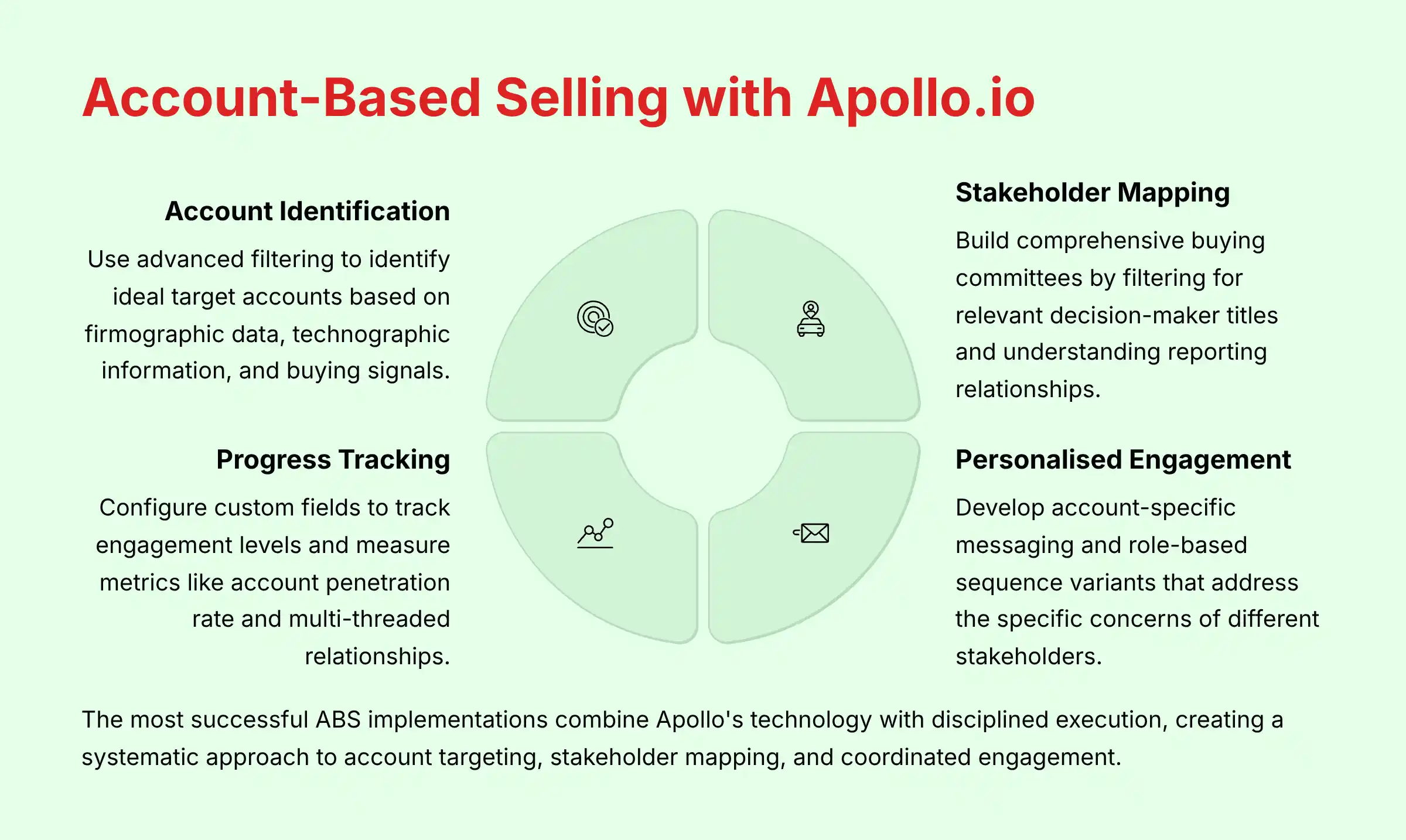 Apollo.io provides powerful capabilities for executing account-based selling (ABS) strategies by enabling teams to identify, research, engage, and track interactions with multiple stakeholders within target accounts. Here's how to leverage the platform most effectively for ABS:
1. Strategic Account Identification and Mapping:
Apollo.io provides powerful capabilities for executing account-based selling (ABS) strategies by enabling teams to identify, research, engage, and track interactions with multiple stakeholders within target accounts. Here's how to leverage the platform most effectively for ABS:
1. Strategic Account Identification and Mapping:
- Use Apollo's advanced filtering to identify ideal target accounts based on:
- Firmographic data (industry, size, revenue)
- Technographic information (current tech stack)
- Buying signals (funding, hiring patterns, growth indicators)
- Create saved account lists organized by tier (A, B, C) or sales territory for focused execution
- Leverage the “Similar Companies” feature to expand your target account list based on successful customers
- Build comprehensive buying committees within each account by filtering for relevant decision-maker titles across departments
- Use Apollo's org chart features to understand reporting relationships and identify key influencers
- Create separate prospect lists for economic buyers, technical evaluators, and end-users at each account
- Develop account-specific messaging templates that reference company challenges, news, or initiatives
- Create role-based sequence variants that address the specific concerns of different stakeholders
- Implement “Account Plays” where multiple team members coordinate outreach to different contacts:
- SDR focuses on initial outreach to mid-level stakeholders
- AE engages director and VP-level decision-makers
- Sales leadership connects with executive sponsors
- Set up account-level news and trigger event monitoring to identify timely outreach opportunities
- Use Apollo's Chrome extension to gather intelligence during account research on company websites and LinkedIn
- Leverage the “Notes” and custom fields features to document account-specific insights that the entire team can access
- Utilize Apollo's team collaboration features to assign ownership of specific contacts within accounts
- Create shared sequences that maintain consistent messaging across the team
- Implement account-specific rules for who engages with which stakeholders to prevent overlapping outreach
- Configure custom fields to track account engagement levels and buying stages
- Build account-level engagement reports that aggregate all touchpoints across contacts
- Measure metrics like:
- Account penetration rate (percentage of relevant stakeholders engaged)
- Multi-threaded relationships (number of active conversations per account)
- Ensure bi-directional sync between Apollo and your CRM for account-level activities
- Create account-based views that show all engagement across the buying committee
- Establish clear processes for documenting account intelligence discovered through Apollo research
Next Steps for Implementation
- Start with Free Plan: Test Apollo.io's data quality and user experience using the free tier before committing to paid plans
- Plan Your Integration: Establish clear CRM sync rules and data ownership policies before connecting Apollo to your existing sales stack
- Focus on Compliance: Implement proper opt-out handling, GDPR controls, and email authentication before launching outreach campaigns
- Measure Results: Establish ROI tracking systems from day one to justify investment and optimize performance over time






Leave a Reply